Specifications are collected from official manufacturer websites. Please verify the specifications before proceeding with your final purchase. If you notice any problem you can report it here.
Quick connection, no problems so far (I have it on a USB 3 port).
It just needs a driver installation, as others have said.
Either it installs automatically on the first connection to the PC, or you download it.
Γρήγορη σύνδεση, κανένα πρόβλημα προς το παρόν (το έχω σε θύρα USB 3).
Απλά θέλει εγκατάσταση driver, όπως είπαν και άλλοι.
Είτε το κάνει αυτόματα στην πρώτη σύνδεση στο PC, είτε τον κατεβάζετε.
Good and fast adapter. It is not plug and play, it requires installation of the drivers included in the stick or you can download them from the company. It detects and allows you to select wifi 2.4GHz or 5GHz or wifi 6.
Καλός και γρήγορος αντάπτορας.Δέν είναι plug and play θέλει εγκατάσταση τους drivers που περιέχονται μέσα στο στικάκι η τους κατεβάζετε από την εταιρία.Βλέπει και επιλέγετε wifi 2,4ghz ή 5 ghz ή wifi 6.
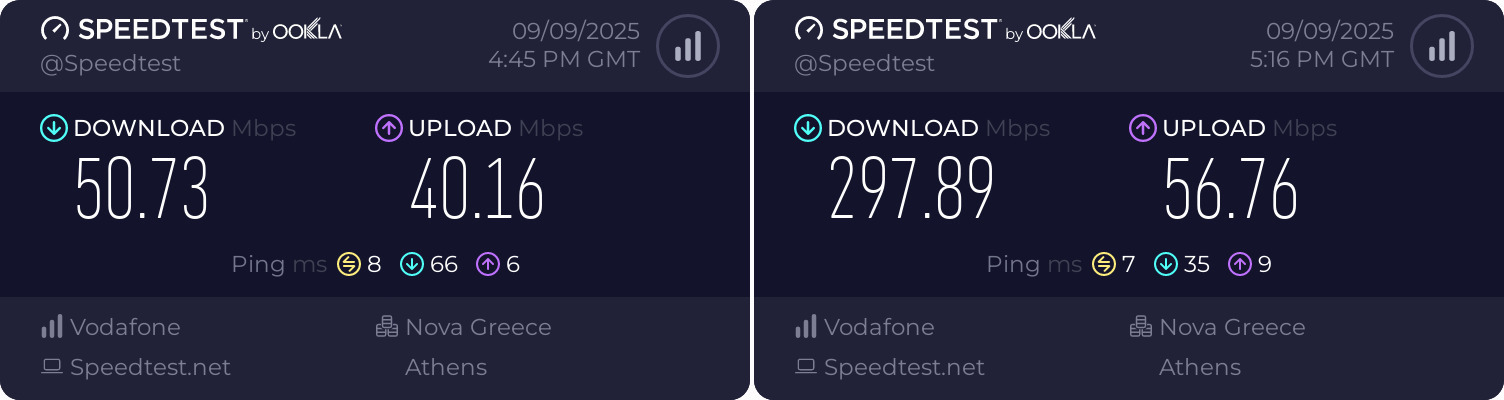
I have an MSI GE70 2PE laptop with WINDOWS 10. The FTTH line was upgraded to 300 but because the laptop is old, the internal wifi card it has doesn't go above a 50Mbps line. To change it to a newer one, I would have to get an internal adaptor for an M.2 slot and still I don't know if it would fit. So I bought the TP-LINK Archer Tx20u, which to be honest I doubted because of its size. You MUST connect it at least to a USB 2.0 port. And as you will see in the photo, in the living room where there are 2 walls between it and the router, on the left before I activated it and on the right after. The difference is obvious. I will return after a month to comment on stability and any disconnections.
UPDATE 28.10.2025: So I return after about a month and I am satisfied. It maintains stable speeds, it has disconnected 3-4 times. And when I say disconnection, I don't necessarily mean you have to re-enter passwords, but it shows as connected, yet the browser page doesn't load.
In this case, we turn off the wifi from the icon at the bottom right, wait a few seconds, and turn it back on and everything is fine.
Έχω laptop MSI GE70 2PE με WINDOWS 10. Η γραμμή FTTH αναβαθμίστηκε στα 300 αλλά επειδή το laptop είναι παλιό, η εσωτερική κάρτα wifi που έχει, δεν πάει πάνω από 50αρα γραμμή. Για να την αλλάξω σε πιο καινούρια, έπρεπε να πάρω και εσωτερικό adaptor για υποδοχή M.2 και πάλι δεν ξέρω αν θα χωρούσε. Οπότε αγόρασα το TP-LINK Archer Tx20u, που η αλήθεια είναι το αμφισβητούσα λόγω μεγέθους. Το συνδέεις ΟΠΩΣΔΗΠΟΤΕ τουλάχιστον σε θύρα USB 2.0. Και όπως θα δείτε στη φωτογραφία, στο σαλόνι που μεσολαβούν 2 τοίχοι για το router αριστερά πριν το ενεργοποιήσω και δεξιά μετά. Εμφανέστατη η διαφορά Θα επιστρέψω μετά από μήνα να πω για σταθερότητα, τυχόν αποσυνδέσεις.
UPDATE 28.10.2025: Επιστρέφω λοιπόν μετά από ένα μήνα περίπου και είμαι ευχαριστημένος. Κρατάει σταθερές ταχύτητες μου έχει κάνει 3-4 φορές αποσύνδεσης. Και όταν εννοώ αποσύνδεση όχι να χρειάζεται απαραίτητα να ξαναβάλεις κωδικούς, αλλά να δείχνει ότι είναι σε σύνδεση, αλλά να μην φορτώνει η σελίδα του browser.
Σε αυτή την περίπτωση κλείνουμε το wifi από το εικονίδιο κάτω δεξιά, περιμένουμε λίγα δευτερόλεπτα. και το ξανανοίγουμε και όλα καλά.
I got it to replace another, cheaper brand, which ultimately drove me crazy with its disconnections; I had to enter the wifi code again and again, which was supposedly saved, signal not at maximum even 5 meters from the router. None of this happens with this one, immediate connection as soon as Windows opens, perfect signal, not a single disconnection so far; if something changes in the future, obviously I don't know, for now 5 stars in the 2 weeks I've had it.
Το πήρα για να αντικαταστήσω ένα άλλο, άλλης μάρκας, πιο φτηνό, το οποίο τελικά μου έβγαλε το λάδι με τις αποσυνδέσεις του, έπρεπε να γράφω ξανά και ξανά τον κωδικό του wifi που ήταν υποτίθεται αποθηκευμένος, σήμα όχι στο μέγιστο ούτε 5 μέτρα απ' το router Τίποτα από αυτά δεν συμβαίνει με τούτο, άμεση σύνδεση με το που ανοίγουν τα windows, τέλειο σήμα, ούτε μία αποσύνδεση μέχρι στιγμής, αν αλλάξει κάτι στο μέλλον προφανώς δεν το ξέρω, για την ώρα 5άστερο στις 2 εβδομάδες που το έχω.
Quick connection, no problems so far (I have it on a USB 3 port).
It just needs a driver installation, as others have said.
Either it installs automatically on the first connection to the PC, or you download it.
Γρήγορη σύνδεση, κανένα πρόβλημα προς το παρόν (το έχω σε θύρα USB 3).
Απλά θέλει εγκατάσταση driver, όπως είπαν και άλλοι.
Είτε το κάνει αυτόματα στην πρώτη σύνδεση στο PC, είτε τον κατεβάζετε.
Good and fast adapter. It is not plug and play, it requires installation of the drivers included in the stick or you can download them from the company. It detects and allows you to select wifi 2.4GHz or 5GHz or wifi 6.
Καλός και γρήγορος αντάπτορας.Δέν είναι plug and play θέλει εγκατάσταση τους drivers που περιέχονται μέσα στο στικάκι η τους κατεβάζετε από την εταιρία.Βλέπει και επιλέγετε wifi 2,4ghz ή 5 ghz ή wifi 6.
I have an MSI GE70 2PE laptop with WINDOWS 10. The FTTH line was upgraded to 300 but because the laptop is old, the internal wifi card it has doesn't go above a 50Mbps line. To change it to a newer one, I would have to get an internal adaptor for an M.2 slot and still I don't know if it would fit. So I bought the TP-LINK Archer Tx20u, which to be honest I doubted because of its size. You MUST connect it at least to a USB 2.0 port. And as you will see in the photo, in the living room where there are 2 walls between it and the router, on the left before I activated it and on the right after. The difference is obvious. I will return after a month to comment on stability and any disconnections.
UPDATE 28.10.2025: So I return after about a month and I am satisfied. It maintains stable speeds, it has disconnected 3-4 times. And when I say disconnection, I don't necessarily mean you have to re-enter passwords, but it shows as connected, yet the browser page doesn't load.
In this case, we turn off the wifi from the icon at the bottom right, wait a few seconds, and turn it back on and everything is fine.
Έχω laptop MSI GE70 2PE με WINDOWS 10. Η γραμμή FTTH αναβαθμίστηκε στα 300 αλλά επειδή το laptop είναι παλιό, η εσωτερική κάρτα wifi που έχει, δεν πάει πάνω από 50αρα γραμμή. Για να την αλλάξω σε πιο καινούρια, έπρεπε να πάρω και εσωτερικό adaptor για υποδοχή M.2 και πάλι δεν ξέρω αν θα χωρούσε. Οπότε αγόρασα το TP-LINK Archer Tx20u, που η αλήθεια είναι το αμφισβητούσα λόγω μεγέθους. Το συνδέεις ΟΠΩΣΔΗΠΟΤΕ τουλάχιστον σε θύρα USB 2.0. Και όπως θα δείτε στη φωτογραφία, στο σαλόνι που μεσολαβούν 2 τοίχοι για το router αριστερά πριν το ενεργοποιήσω και δεξιά μετά. Εμφανέστατη η διαφορά Θα επιστρέψω μετά από μήνα να πω για σταθερότητα, τυχόν αποσυνδέσεις.
UPDATE 28.10.2025: Επιστρέφω λοιπόν μετά από ένα μήνα περίπου και είμαι ευχαριστημένος. Κρατάει σταθερές ταχύτητες μου έχει κάνει 3-4 φορές αποσύνδεσης. Και όταν εννοώ αποσύνδεση όχι να χρειάζεται απαραίτητα να ξαναβάλεις κωδικούς, αλλά να δείχνει ότι είναι σε σύνδεση, αλλά να μην φορτώνει η σελίδα του browser.
Σε αυτή την περίπτωση κλείνουμε το wifi από το εικονίδιο κάτω δεξιά, περιμένουμε λίγα δευτερόλεπτα. και το ξανανοίγουμε και όλα καλά.
I got it to replace another, cheaper brand, which ultimately drove me crazy with its disconnections; I had to enter the wifi code again and again, which was supposedly saved, signal not at maximum even 5 meters from the router. None of this happens with this one, immediate connection as soon as Windows opens, perfect signal, not a single disconnection so far; if something changes in the future, obviously I don't know, for now 5 stars in the 2 weeks I've had it.
Το πήρα για να αντικαταστήσω ένα άλλο, άλλης μάρκας, πιο φτηνό, το οποίο τελικά μου έβγαλε το λάδι με τις αποσυνδέσεις του, έπρεπε να γράφω ξανά και ξανά τον κωδικό του wifi που ήταν υποτίθεται αποθηκευμένος, σήμα όχι στο μέγιστο ούτε 5 μέτρα απ' το router Τίποτα από αυτά δεν συμβαίνει με τούτο, άμεση σύνδεση με το που ανοίγουν τα windows, τέλειο σήμα, ούτε μία αποσύνδεση μέχρι στιγμής, αν αλλάξει κάτι στο μέλλον προφανώς δεν το ξέρω, για την ώρα 5άστερο στις 2 εβδομάδες που το έχω.
Specifications are collected from official manufacturer websites. Please verify the specifications before proceeding with your final purchase. If you notice any problem you can report it here.
Quick connection, no problems so far (I have it on a USB 3 port).
It just needs a driver installation, as others have said.
Either it installs automatically on the first connection to the PC, or you download it.
Γρήγορη σύνδεση, κανένα πρόβλημα προς το παρόν (το έχω σε θύρα USB 3).
Απλά θέλει εγκατάσταση driver, όπως είπαν και άλλοι.
Είτε το κάνει αυτόματα στην πρώτη σύνδεση στο PC, είτε τον κατεβάζετε.
Good and fast adapter. It is not plug and play, it requires installation of the drivers included in the stick or you can download them from the company. It detects and allows you to select wifi 2.4GHz or 5GHz or wifi 6.
Καλός και γρήγορος αντάπτορας.Δέν είναι plug and play θέλει εγκατάσταση τους drivers που περιέχονται μέσα στο στικάκι η τους κατεβάζετε από την εταιρία.Βλέπει και επιλέγετε wifi 2,4ghz ή 5 ghz ή wifi 6.
I have an MSI GE70 2PE laptop with WINDOWS 10. The FTTH line was upgraded to 300 but because the laptop is old, the internal wifi card it has doesn't go above a 50Mbps line. To change it to a newer one, I would have to get an internal adaptor for an M.2 slot and still I don't know if it would fit. So I bought the TP-LINK Archer Tx20u, which to be honest I doubted because of its size. You MUST connect it at least to a USB 2.0 port. And as you will see in the photo, in the living room where there are 2 walls between it and the router, on the left before I activated it and on the right after. The difference is obvious. I will return after a month to comment on stability and any disconnections.
UPDATE 28.10.2025: So I return after about a month and I am satisfied. It maintains stable speeds, it has disconnected 3-4 times. And when I say disconnection, I don't necessarily mean you have to re-enter passwords, but it shows as connected, yet the browser page doesn't load.
In this case, we turn off the wifi from the icon at the bottom right, wait a few seconds, and turn it back on and everything is fine.
Έχω laptop MSI GE70 2PE με WINDOWS 10. Η γραμμή FTTH αναβαθμίστηκε στα 300 αλλά επειδή το laptop είναι παλιό, η εσωτερική κάρτα wifi που έχει, δεν πάει πάνω από 50αρα γραμμή. Για να την αλλάξω σε πιο καινούρια, έπρεπε να πάρω και εσωτερικό adaptor για υποδοχή M.2 και πάλι δεν ξέρω αν θα χωρούσε. Οπότε αγόρασα το TP-LINK Archer Tx20u, που η αλήθεια είναι το αμφισβητούσα λόγω μεγέθους. Το συνδέεις ΟΠΩΣΔΗΠΟΤΕ τουλάχιστον σε θύρα USB 2.0. Και όπως θα δείτε στη φωτογραφία, στο σαλόνι που μεσολαβούν 2 τοίχοι για το router αριστερά πριν το ενεργοποιήσω και δεξιά μετά. Εμφανέστατη η διαφορά Θα επιστρέψω μετά από μήνα να πω για σταθερότητα, τυχόν αποσυνδέσεις.
UPDATE 28.10.2025: Επιστρέφω λοιπόν μετά από ένα μήνα περίπου και είμαι ευχαριστημένος. Κρατάει σταθερές ταχύτητες μου έχει κάνει 3-4 φορές αποσύνδεσης. Και όταν εννοώ αποσύνδεση όχι να χρειάζεται απαραίτητα να ξαναβάλεις κωδικούς, αλλά να δείχνει ότι είναι σε σύνδεση, αλλά να μην φορτώνει η σελίδα του browser.
Σε αυτή την περίπτωση κλείνουμε το wifi από το εικονίδιο κάτω δεξιά, περιμένουμε λίγα δευτερόλεπτα. και το ξανανοίγουμε και όλα καλά.
I got it to replace another, cheaper brand, which ultimately drove me crazy with its disconnections; I had to enter the wifi code again and again, which was supposedly saved, signal not at maximum even 5 meters from the router. None of this happens with this one, immediate connection as soon as Windows opens, perfect signal, not a single disconnection so far; if something changes in the future, obviously I don't know, for now 5 stars in the 2 weeks I've had it.
Το πήρα για να αντικαταστήσω ένα άλλο, άλλης μάρκας, πιο φτηνό, το οποίο τελικά μου έβγαλε το λάδι με τις αποσυνδέσεις του, έπρεπε να γράφω ξανά και ξανά τον κωδικό του wifi που ήταν υποτίθεται αποθηκευμένος, σήμα όχι στο μέγιστο ούτε 5 μέτρα απ' το router Τίποτα από αυτά δεν συμβαίνει με τούτο, άμεση σύνδεση με το που ανοίγουν τα windows, τέλειο σήμα, ούτε μία αποσύνδεση μέχρι στιγμής, αν αλλάξει κάτι στο μέλλον προφανώς δεν το ξέρω, για την ώρα 5άστερο στις 2 εβδομάδες που το έχω.
Quick connection, no problems so far (I have it on a USB 3 port).
It just needs a driver installation, as others have said.
Either it installs automatically on the first connection to the PC, or you download it.
Γρήγορη σύνδεση, κανένα πρόβλημα προς το παρόν (το έχω σε θύρα USB 3).
Απλά θέλει εγκατάσταση driver, όπως είπαν και άλλοι.
Είτε το κάνει αυτόματα στην πρώτη σύνδεση στο PC, είτε τον κατεβάζετε.
Good and fast adapter. It is not plug and play, it requires installation of the drivers included in the stick or you can download them from the company. It detects and allows you to select wifi 2.4GHz or 5GHz or wifi 6.
Καλός και γρήγορος αντάπτορας.Δέν είναι plug and play θέλει εγκατάσταση τους drivers που περιέχονται μέσα στο στικάκι η τους κατεβάζετε από την εταιρία.Βλέπει και επιλέγετε wifi 2,4ghz ή 5 ghz ή wifi 6.
I have an MSI GE70 2PE laptop with WINDOWS 10. The FTTH line was upgraded to 300 but because the laptop is old, the internal wifi card it has doesn't go above a 50Mbps line. To change it to a newer one, I would have to get an internal adaptor for an M.2 slot and still I don't know if it would fit. So I bought the TP-LINK Archer Tx20u, which to be honest I doubted because of its size. You MUST connect it at least to a USB 2.0 port. And as you will see in the photo, in the living room where there are 2 walls between it and the router, on the left before I activated it and on the right after. The difference is obvious. I will return after a month to comment on stability and any disconnections.
UPDATE 28.10.2025: So I return after about a month and I am satisfied. It maintains stable speeds, it has disconnected 3-4 times. And when I say disconnection, I don't necessarily mean you have to re-enter passwords, but it shows as connected, yet the browser page doesn't load.
In this case, we turn off the wifi from the icon at the bottom right, wait a few seconds, and turn it back on and everything is fine.
Έχω laptop MSI GE70 2PE με WINDOWS 10. Η γραμμή FTTH αναβαθμίστηκε στα 300 αλλά επειδή το laptop είναι παλιό, η εσωτερική κάρτα wifi που έχει, δεν πάει πάνω από 50αρα γραμμή. Για να την αλλάξω σε πιο καινούρια, έπρεπε να πάρω και εσωτερικό adaptor για υποδοχή M.2 και πάλι δεν ξέρω αν θα χωρούσε. Οπότε αγόρασα το TP-LINK Archer Tx20u, που η αλήθεια είναι το αμφισβητούσα λόγω μεγέθους. Το συνδέεις ΟΠΩΣΔΗΠΟΤΕ τουλάχιστον σε θύρα USB 2.0. Και όπως θα δείτε στη φωτογραφία, στο σαλόνι που μεσολαβούν 2 τοίχοι για το router αριστερά πριν το ενεργοποιήσω και δεξιά μετά. Εμφανέστατη η διαφορά Θα επιστρέψω μετά από μήνα να πω για σταθερότητα, τυχόν αποσυνδέσεις.
UPDATE 28.10.2025: Επιστρέφω λοιπόν μετά από ένα μήνα περίπου και είμαι ευχαριστημένος. Κρατάει σταθερές ταχύτητες μου έχει κάνει 3-4 φορές αποσύνδεσης. Και όταν εννοώ αποσύνδεση όχι να χρειάζεται απαραίτητα να ξαναβάλεις κωδικούς, αλλά να δείχνει ότι είναι σε σύνδεση, αλλά να μην φορτώνει η σελίδα του browser.
Σε αυτή την περίπτωση κλείνουμε το wifi από το εικονίδιο κάτω δεξιά, περιμένουμε λίγα δευτερόλεπτα. και το ξανανοίγουμε και όλα καλά.
I got it to replace another, cheaper brand, which ultimately drove me crazy with its disconnections; I had to enter the wifi code again and again, which was supposedly saved, signal not at maximum even 5 meters from the router. None of this happens with this one, immediate connection as soon as Windows opens, perfect signal, not a single disconnection so far; if something changes in the future, obviously I don't know, for now 5 stars in the 2 weeks I've had it.
Το πήρα για να αντικαταστήσω ένα άλλο, άλλης μάρκας, πιο φτηνό, το οποίο τελικά μου έβγαλε το λάδι με τις αποσυνδέσεις του, έπρεπε να γράφω ξανά και ξανά τον κωδικό του wifi που ήταν υποτίθεται αποθηκευμένος, σήμα όχι στο μέγιστο ούτε 5 μέτρα απ' το router Τίποτα από αυτά δεν συμβαίνει με τούτο, άμεση σύνδεση με το που ανοίγουν τα windows, τέλειο σήμα, ούτε μία αποσύνδεση μέχρι στιγμής, αν αλλάξει κάτι στο μέλλον προφανώς δεν το ξέρω, για την ώρα 5άστερο στις 2 εβδομάδες που το έχω.