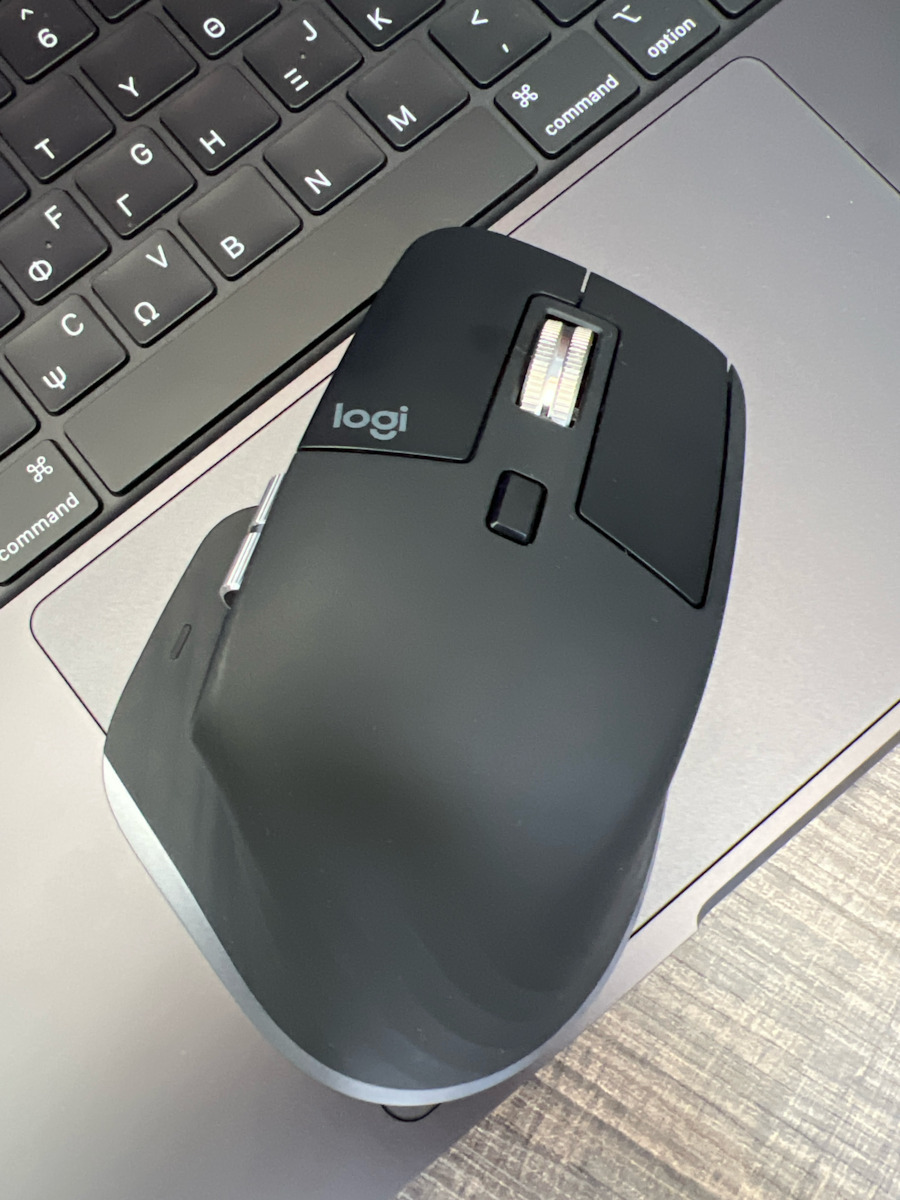
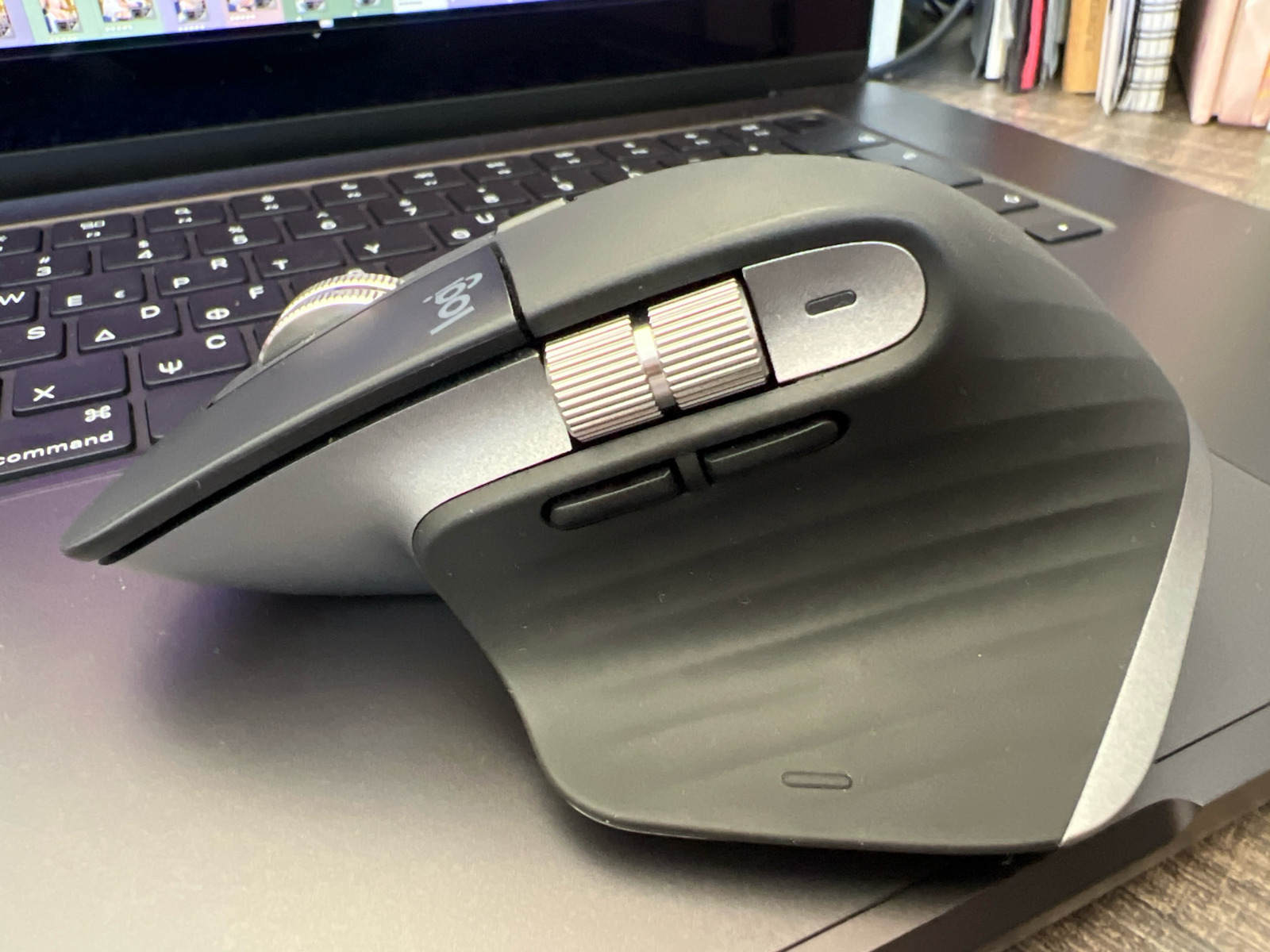
Introducing the MX Master 3S, an iconic mouse with a refreshed design. Compatible with macOS, iPadOS, and seamlessly integrated into the Apple ecosystem for high performance, with colors inspired by Macs, silent clicks, and an 8K DPI sensor that works on glass.
Operation: Wired, Bluetooth
PIXEL-LEVEL PRECISION WITH 8,000 DPI TRACKING
The MX Master 3S for Mac is equipped with our most precise sensor, offering next-generation accuracy and responsiveness.
Work on high-resolution displays with an 8,000 DPI optical sensor that works on virtually any surface – even on glass. Customize the tracking sensitivity from Logi Options+ and adjust it to your preference.
Comfort Meets Silent Clicks
Create and work with the same click feel, but less noise. Silent clicks offer pleasant and soft tactile feedback, with 90% less noise.
With an iconic shape, designed to fit your hand, the unique tilt angle of the MX Master 3S for Mac places the forearm in a more natural position, for greater comfort.
SCROLLING 1,000 LINES PER SECOND
The electromagnetic MagSpeed scroll wheel is so precise that it stops on a pixel and so fast that it allows you to scroll 1,000 lines per second. And it is almost silent.
The machined steel of the wheel has excellent haptic feedback and the right weight to provide satisfying dynamic inertia that you feel but don't hear.
ABILITY TO CONNECT WITH MULTIPLE MACS
Easily pair your MacBook, iMac, and iPad via Bluetooth® Low Energy, and switch between them with the press of a button. Connecting up to 3 devices is now easier than ever.
The MX keyboard follows the MX mouse with Flow technology support, from one Mac computer or laptop to another. This means you can work on multiple Mac computers smoothly without interrupting your workflow. With Logi Options+, transfer files, documents, and images between devices and operating systems macOS and Windows.
Fast Charging, Instant Connection
The MX Master 3S for Mac stays powered for up to 70 days on a full charge and provides three hours of use with a one-minute quick charge. Use the included USB-C to USB-C charging cable for recharging.
Specifications are collected from official manufacturer websites. Please verify the specifications before proceeding with your final purchase. If you notice any problem you can report it here.
The Logitech MX Master 3S for Mac is a high-quality and very comfortable mouse, specifically made for Mac users. It is wireless, easily connects via Bluetooth, and works flawlessly with MacBook, iMac, and iPad.
What I liked:
It is very comfortable in the hand, even after many hours of use.
The buttons are silent, which is ideal for an office or quiet environment.
Scrolling is very easy and fast, especially when reading long texts or scrolling through web pages.
It connects to up to 3 devices, and you can switch between them with the press of a button.
It has a very good battery – lasts weeks on a single charge!
What to keep in mind:
It is a bit more expensive than simple mice, but the quality justifies it.
It is not suitable for left-handed users (it is ergonomically made for right-handed users).
Το Logitech MX Master 3S for Mac είναι ένα ποιοτικό και πολύ άνετο ποντίκι, ειδικά φτιαγμένο για χρήστες Mac. Είναι ασύρματο, συνδέεται εύκολα με Bluetooth και λειτουργεί άψογα με MacBook, iMac και iPad.
Τι μου άρεσε:
Είναι πολύ άνετο στο χέρι, ακόμα και μετά από πολλές ώρες χρήσης.
Τα κουμπιά είναι αθόρυβα, κάτι που είναι ιδανικό για γραφείο ή ήσυχο περιβάλλον.
Η κύλιση είναι πανεύκολη και γρήγορη, ειδικά όταν διαβάζεις μεγάλα κείμενα ή κάνεις scroll σε ιστοσελίδες.
Συνδέεται με έως και 3 συσκευές, και αλλάζεις μεταξύ τους με το πάτημα ενός κουμπιού.
Έχει πολύ καλή μπαταρία – κρατάει εβδομάδες με μία φόρτιση!
Τι να έχεις υπόψη:
Είναι λίγο πιο ακριβό από απλά ποντίκια, αλλά η ποιότητα το δικαιολογεί.
Δεν είναι κατάλληλο για αριστερόχειρες (είναι εργονομικά φτιαγμένο για δεξιόχειρες).
I use it with a MacMini. The mouse is worth every penny. Incredible grip, the buttons can be customized as everyone wants and with the ability to adjust per application. Well balanced and sturdy construction. I highly recommend it.
To χρησιμοποιώ με MacMini. Το ποντίκι είναι όλα τα λεφτά. Τρομερό κράτημα, τα κουμπιά του προσαρμόζονται όπως θέλει ο καθένας και με δυνατότητα προσαρμογής ανά εφαρμογή. Σωστά ζυγισμένο και στοιβαρή κατασκευή. Το προτείνω ανεπιφύλακτα.
Excellent mouse, ease in tasks and in productivity. Overall, you can customize the buttons as you wish, and it makes it extremely functional. I give it 4 stars because it has a slow response time on Mac, both in the cursor and in scrolling…
Εξαιρετικό ποντίκι, ευκολία σε tasks και σε productivity. Γενικότερα μπορείς να προσαρμόσεις τα κουμπιά όπως θέλεις εσυ, και το κάνει εξαιρετικά λειτουργικό. Βάζω 4 αστέρια γιατί έχει αργό χρόνο ανταπόκρισης σε mac και στον κέρσορα και στην κύλιση…
I used the MX Master 2 for years and was incredibly satisfied. After about 7 years of use, the mouse broke and I decided to upgrade to the MX Master 3S, white variant. The mouse is very good, but the 3 stars are for the rubber, which kids, yellows no matter how much you wash your hands. I thought it wouldn't happen to me, but it is inevitable. I wish I could return it and get the black version.
Χρησιμοποιούσα για χρόνια το MX Master 2 και έμεινα απίστευτα ευχαριστημένος. Μετά από περίπου 7 χρόνια χρήσης, το ποντίκι χάλασε και αποφάσισα να κάνω την αναβάθμιση στο MX Master 3S, λευκό variant. Το ποντίκι είναι πολύ καλό, όμως τα 3 αστέρια είναι για το rubber, το οποίο παιδιά κιτρινίζει όσο και να πλένετε τα χέρια σας. Πίστευα πως σε εμένα δεν θα συμβεί, κι όμως είναι αναπόφευκτο. Εύχομαι να μπορέσω να το επιστρέψω και να πάρω την μαύρη έκδοση.
In many games, the side buttons do not work even after programming through the application. The battery lasts about 2-3 weeks and I use the thumb's hidden button for trackpad gestures. It has had some strange disconnects, but overall it is a powerful tool, especially for Mac users
Σε πολλά παιχνίδια τα πλαϊνά κουμπιά δεν λειτουργούν ακόμα και μετά από προγραμματισμό μέσα από την εφαρμογή. Η μπαταρία μου βγάζει περίπου 2-3 εβδομάδες και το κρυφό κουμπί του αντίχειρα το χρησιμοποιώ για τα gestures του trackpad. Μου έχει κάνει κάποια περίεργα disconnects αλλα κατα τα άλλα που δυνατό εργαλείο ειδικά για χρήστες μακ
The MX Master is the mouse that I prefer for 6-7 years now (if my memory doesn't betray me).
The 3S follows the reputation of its predecessors and is an excellent mouse for everyday office use (I'm not a gamer). The battery lasts a lot and when charging is needed, it is very fast.
Τα ΜΧ Master είναι τα ποντίκια που προτιμώ εδώ και 6-7 χρόνια (αν δεν με προδίδει η μνήμη μου).
Το 3S ακολουθεί τη φήμη των προκατόχων του και είναι ένα άψογο ποντίκι για καθημερινή χρήση γραφείου (δεν είμαι gamer). Η μπαταρία διαρκεί πολύ και όταν απαιτείται φόρτιση είναι πολύ γρήγορη.
The present model does not include a receiver for connection to computers that do not have built-in Bluetooth. It says it on the packaging but it is not mentioned in the specifications. It will not work wirelessly if your computer does not have Bluetooth.
Το παρόν μοντέλο δεν περιέχει receiver για σύνδεση με υπολογιστές που δεν έχουν built-in bluetooth. Το λέει στη συσκευασία αλλά δεν αναφέρετε στα χαρακτηριστικά.
Δεν θα δουλέψει ασύρματα εάν ο υπολογιστής σας δεν έχει Bluetooth.
Owner of the entire series for the past few years and I use it on PC / Mac. When I first opened the box, I thought it was broken because I pressed the buttons and didn't hear a click, but then I realized it's the silent version and it takes 10 minutes to get used to it. The positives are that the MACBOOK M1 (120Hz) solves the problem that the entire MX series had, as they work on a different Bluetooth frequency and the screen responds at 60Hz when you move windows or zoom in, etc. But with this mouse, the problem is solved as it responds properly at 120Hz in all functions. The MAC STUDIO has significantly improved movement due to a better sensor.
Kατοχος ολης της σειρας τα τελευταια χρονια και το χρησιμοποιω σε PC / Mac. Μολις ανοιξα το κουτι νομιζα οτι ηταν χαλασμενο διοτι παταγα τα κουμπια και δεν ακουγα click αλλα μετα καταλαβα οτι ειναι το αθορυβο version και θελει 10 λεπτα να το συνηθησεις. Τα θετικα
MACBOOK M1 (120Hz) Για οποιον δεν γνωριζει ολη η σειρα MX ειχε προβλημα επειδη δουλευουν σε διαφορετικη συχνοτητα bluetooth και οι οθονη ανταποκρινεται στα 60 Ηz οταν μετακινησεις παραθυρα, ζουμαρεις κλπ αλλα με αυτο το ποντικι λυθησε το προβλημα οπου στα 120 Ηz ανταποκρινεται κανονικα σε ολες τις λειτουργιες.
https://forums.macrumors.com/threads/be-wary-buying-mx-master-3-for-mac.2289654/page-4
MAC STUDIO εχει βελτιωθει αρκετα η κινηση λογω καλυτερου αισθητηρα.
The evaluation is for the white variant of the mouse. I won't dwell on its technical characteristics, comfort, and battery life because they are simply top in the category.
However, it has a very basic problem, and that is that the white color distorts and quickly changes color in areas to the right and left of the mouse, acquiring a yellow hue, regardless of how careful you are in regularly washing your hands and cleaning it with a cloth, and this is due to the different soft plastic that is different from what is on the keys.
So if you want a white mouse, it's better to stay away from this one.
Η αξιολόγηση είναι για το λευκό variant του ποντικιού. Δεν θα σταθώ στα τεχνικά του χαρακτηρηστικά, στην άνεση και την μπαταρία γιατί απλά είναι τοπ στην κατηγορία.
Έχει όμως ένα πολύ βασικό πρόβλημα, και αυτό είναι ότι το λευκό αλλοιώνεται και αλλάζει γρήγορα χρώμα σε περιοχές δεξιά και αριστερά του ποντικιού και αποκτάει ένα κίτρινο hue, άσχετα με το πόσο προσεκτικοί είστε με το να πλένετε τακτικά τα χέρια σας και να το καθαρίζετε με πανάκι και αυτό οφείλεται στο διαφορετικό soft πλαστικό που είναι διαφορετικό από αυτό που υπάρχει στα πλήκτρα.
Οπότε εαν θέλετε Λευκό ποντίκι, καλύτερα μακριά από το συγκεκριμένο.
Very good mouse but not for 100+ €. The negative is that it doesn't have on-board memory, unlike Logitech gaming mice which have it and are cheaper.
Πολυ καλό ποντίκι αλλα οχι για 100+ €. Το αρνητικό είναι οτι δεν εχει on-board memory σε αντίθεση με gaming ποντίκια της Logitech που έχουν και ειναι φθηνότερα.
I believed that the company's experience in peripherals, combined with the special edition they have made for Mac, would finally give us an ergonomic tool to replace the Magic Mouse. Alas, it is very good in terms of grip and its battery seems to have good durability, and that's where any positive opinion I have about it ends. The cursor does not move accurately, it makes various strange jumps, so when you want to click somewhere, you end up making 1-2 passes, as if you can't find parking. The two scroll wheels have their own thing, but you can't use them simultaneously. Overall, it's a lot of money for a mouse that doesn't work properly.
Update 02.2024: It now works much better, with greater accuracy. This lag that it used to have appears less frequently now.
Πίστευα ότι η εμπειρία της εταιρείας στα περιφερειακά υπολογιστών σε συνδυασμό με την ειδική έκδοση που έχουν κάνει εδώ για mac θα μας έδινε επιτέλους ένα εργονομικό εργαλείο για να αντικαταστήσουμε το Magic Mouse. Φευ. Είναι πολύ καλό στο κράτημα και η μπαταρία του φαίνεται να είναι καλή σε διάρκεια και κάπου εδώ τελειώνει οποιαδήποτε θετική άποψη έχω για αυτό. Ο κέρσορας δεν κινείται με ακρίβεια, κάνει διάφορα περίεργα πηδήματα με αποτέλεσμα όταν θες να κλικάρεις κάπου να κάνεις 1-2 περάσματα, λες και δεν βρίσκεις πάρκινγκ ένα πράγμα. Τα 2 scroll wheels έχουν τη φάση τους, αλλά δεν μπορείς να τα χρησιμοποιήσεις συγχρόνως. Γενικότερα, πολλά λεφτά για ένα ποντίκι που δεν δουλεύει όπως πρέπει.
Update 02.2024: Πλέον δουλεύει πολύ καλύτερα, με μεγαλύτερη ακρίβεια. Αυτό το lag που είχε εμφανίζεται πιο σπάνια πλέον.
I bought it after doing some research on my MacBook! From the very first moment, I realized how good and comfortable it is! The use I make is photo and video editing, so with all the functions and adjustments, it was the best choice!
Το αγόρασα μετά απο σχετικη ερευνα για το macbook μου! Απο την πρωτη κιολας στιγμη καταλαβα ποσο καλο κ ανετο ειναι ! Η χρηση που κανω ειναι επεξεργασια φωτογραφιας κ βιντεο οποτε με ολες τις λειτουργιες και τις προσαρμογες ηταν η καλυτερη επιλογη!!
I have been using only the Magic Mouse for over 10 years. I wonder how I lived without it... it is comfortable and ergonomic. It has incredible capabilities and can be customized even on a per-application basis. It is expensive for a mouse, but it truly is worth the investment.
Χρησιμοποιώ πάνω από 10 χρόνια μόνο Magic Mouse. Απορώ πως ζούσα χωρίς αυτό… είναι άνετο και εργονομικό. Έχει απίστευτες δυνατότητες και μπορεί να παραμετροποιηθεί ακόμα και ανά εφαρμογή. Είναι ακριβό σαν ποντίκι αλλά πραγματικά αξίζει την επένδυση.
The Logitech MX Master 3S for Mac is a high-quality and very comfortable mouse, specifically made for Mac users. It is wireless, easily connects via Bluetooth, and works flawlessly with MacBook, iMac, and iPad.
What I liked:
It is very comfortable in the hand, even after many hours of use.
The buttons are silent, which is ideal for an office or quiet environment.
Scrolling is very easy and fast, especially when reading long texts or scrolling through web pages.
It connects to up to 3 devices, and you can switch between them with the press of a button.
It has a very good battery – lasts weeks on a single charge!
What to keep in mind:
It is a bit more expensive than simple mice, but the quality justifies it.
It is not suitable for left-handed users (it is ergonomically made for right-handed users).
Το Logitech MX Master 3S for Mac είναι ένα ποιοτικό και πολύ άνετο ποντίκι, ειδικά φτιαγμένο για χρήστες Mac. Είναι ασύρματο, συνδέεται εύκολα με Bluetooth και λειτουργεί άψογα με MacBook, iMac και iPad.
Τι μου άρεσε:
Είναι πολύ άνετο στο χέρι, ακόμα και μετά από πολλές ώρες χρήσης.
Τα κουμπιά είναι αθόρυβα, κάτι που είναι ιδανικό για γραφείο ή ήσυχο περιβάλλον.
Η κύλιση είναι πανεύκολη και γρήγορη, ειδικά όταν διαβάζεις μεγάλα κείμενα ή κάνεις scroll σε ιστοσελίδες.
Συνδέεται με έως και 3 συσκευές, και αλλάζεις μεταξύ τους με το πάτημα ενός κουμπιού.
Έχει πολύ καλή μπαταρία – κρατάει εβδομάδες με μία φόρτιση!
Τι να έχεις υπόψη:
Είναι λίγο πιο ακριβό από απλά ποντίκια, αλλά η ποιότητα το δικαιολογεί.
Δεν είναι κατάλληλο για αριστερόχειρες (είναι εργονομικά φτιαγμένο για δεξιόχειρες).
I use it with a MacMini. The mouse is worth every penny. Incredible grip, the buttons can be customized as everyone wants and with the ability to adjust per application. Well balanced and sturdy construction. I highly recommend it.
To χρησιμοποιώ με MacMini. Το ποντίκι είναι όλα τα λεφτά. Τρομερό κράτημα, τα κουμπιά του προσαρμόζονται όπως θέλει ο καθένας και με δυνατότητα προσαρμογής ανά εφαρμογή. Σωστά ζυγισμένο και στοιβαρή κατασκευή. Το προτείνω ανεπιφύλακτα.
Introducing the MX Master 3S, an iconic mouse with a refreshed design. Compatible with macOS, iPadOS, and seamlessly integrated into the Apple ecosystem for high performance, with colors inspired by Macs, silent clicks, and an 8K DPI sensor that works on glass.
Operation: Wired, Bluetooth
PIXEL-LEVEL PRECISION WITH 8,000 DPI TRACKING
The MX Master 3S for Mac is equipped with our most precise sensor, offering next-generation accuracy and responsiveness.
Work on high-resolution displays with an 8,000 DPI optical sensor that works on virtually any surface – even on glass. Customize the tracking sensitivity from Logi Options+ and adjust it to your preference.
Comfort Meets Silent Clicks
Create and work with the same click feel, but less noise. Silent clicks offer pleasant and soft tactile feedback, with 90% less noise.
With an iconic shape, designed to fit your hand, the unique tilt angle of the MX Master 3S for Mac places the forearm in a more natural position, for greater comfort.
SCROLLING 1,000 LINES PER SECOND
The electromagnetic MagSpeed scroll wheel is so precise that it stops on a pixel and so fast that it allows you to scroll 1,000 lines per second. And it is almost silent.
The machined steel of the wheel has excellent haptic feedback and the right weight to provide satisfying dynamic inertia that you feel but don't hear.
ABILITY TO CONNECT WITH MULTIPLE MACS
Easily pair your MacBook, iMac, and iPad via Bluetooth® Low Energy, and switch between them with the press of a button. Connecting up to 3 devices is now easier than ever.
The MX keyboard follows the MX mouse with Flow technology support, from one Mac computer or laptop to another. This means you can work on multiple Mac computers smoothly without interrupting your workflow. With Logi Options+, transfer files, documents, and images between devices and operating systems macOS and Windows.
Fast Charging, Instant Connection
The MX Master 3S for Mac stays powered for up to 70 days on a full charge and provides three hours of use with a one-minute quick charge. Use the included USB-C to USB-C charging cable for recharging.
Specifications are collected from official manufacturer websites. Please verify the specifications before proceeding with your final purchase. If you notice any problem you can report it here.
The Logitech MX Master 3S for Mac is a high-quality and very comfortable mouse, specifically made for Mac users. It is wireless, easily connects via Bluetooth, and works flawlessly with MacBook, iMac, and iPad.
What I liked:
It is very comfortable in the hand, even after many hours of use.
The buttons are silent, which is ideal for an office or quiet environment.
Scrolling is very easy and fast, especially when reading long texts or scrolling through web pages.
It connects to up to 3 devices, and you can switch between them with the press of a button.
It has a very good battery – lasts weeks on a single charge!
What to keep in mind:
It is a bit more expensive than simple mice, but the quality justifies it.
It is not suitable for left-handed users (it is ergonomically made for right-handed users).
Το Logitech MX Master 3S for Mac είναι ένα ποιοτικό και πολύ άνετο ποντίκι, ειδικά φτιαγμένο για χρήστες Mac. Είναι ασύρματο, συνδέεται εύκολα με Bluetooth και λειτουργεί άψογα με MacBook, iMac και iPad.
Τι μου άρεσε:
Είναι πολύ άνετο στο χέρι, ακόμα και μετά από πολλές ώρες χρήσης.
Τα κουμπιά είναι αθόρυβα, κάτι που είναι ιδανικό για γραφείο ή ήσυχο περιβάλλον.
Η κύλιση είναι πανεύκολη και γρήγορη, ειδικά όταν διαβάζεις μεγάλα κείμενα ή κάνεις scroll σε ιστοσελίδες.
Συνδέεται με έως και 3 συσκευές, και αλλάζεις μεταξύ τους με το πάτημα ενός κουμπιού.
Έχει πολύ καλή μπαταρία – κρατάει εβδομάδες με μία φόρτιση!
Τι να έχεις υπόψη:
Είναι λίγο πιο ακριβό από απλά ποντίκια, αλλά η ποιότητα το δικαιολογεί.
Δεν είναι κατάλληλο για αριστερόχειρες (είναι εργονομικά φτιαγμένο για δεξιόχειρες).
I use it with a MacMini. The mouse is worth every penny. Incredible grip, the buttons can be customized as everyone wants and with the ability to adjust per application. Well balanced and sturdy construction. I highly recommend it.
To χρησιμοποιώ με MacMini. Το ποντίκι είναι όλα τα λεφτά. Τρομερό κράτημα, τα κουμπιά του προσαρμόζονται όπως θέλει ο καθένας και με δυνατότητα προσαρμογής ανά εφαρμογή. Σωστά ζυγισμένο και στοιβαρή κατασκευή. Το προτείνω ανεπιφύλακτα.
Excellent mouse, ease in tasks and in productivity. Overall, you can customize the buttons as you wish, and it makes it extremely functional. I give it 4 stars because it has a slow response time on Mac, both in the cursor and in scrolling…
Εξαιρετικό ποντίκι, ευκολία σε tasks και σε productivity. Γενικότερα μπορείς να προσαρμόσεις τα κουμπιά όπως θέλεις εσυ, και το κάνει εξαιρετικά λειτουργικό. Βάζω 4 αστέρια γιατί έχει αργό χρόνο ανταπόκρισης σε mac και στον κέρσορα και στην κύλιση…
I used the MX Master 2 for years and was incredibly satisfied. After about 7 years of use, the mouse broke and I decided to upgrade to the MX Master 3S, white variant. The mouse is very good, but the 3 stars are for the rubber, which kids, yellows no matter how much you wash your hands. I thought it wouldn't happen to me, but it is inevitable. I wish I could return it and get the black version.
Χρησιμοποιούσα για χρόνια το MX Master 2 και έμεινα απίστευτα ευχαριστημένος. Μετά από περίπου 7 χρόνια χρήσης, το ποντίκι χάλασε και αποφάσισα να κάνω την αναβάθμιση στο MX Master 3S, λευκό variant. Το ποντίκι είναι πολύ καλό, όμως τα 3 αστέρια είναι για το rubber, το οποίο παιδιά κιτρινίζει όσο και να πλένετε τα χέρια σας. Πίστευα πως σε εμένα δεν θα συμβεί, κι όμως είναι αναπόφευκτο. Εύχομαι να μπορέσω να το επιστρέψω και να πάρω την μαύρη έκδοση.
In many games, the side buttons do not work even after programming through the application. The battery lasts about 2-3 weeks and I use the thumb's hidden button for trackpad gestures. It has had some strange disconnects, but overall it is a powerful tool, especially for Mac users
Σε πολλά παιχνίδια τα πλαϊνά κουμπιά δεν λειτουργούν ακόμα και μετά από προγραμματισμό μέσα από την εφαρμογή. Η μπαταρία μου βγάζει περίπου 2-3 εβδομάδες και το κρυφό κουμπί του αντίχειρα το χρησιμοποιώ για τα gestures του trackpad. Μου έχει κάνει κάποια περίεργα disconnects αλλα κατα τα άλλα που δυνατό εργαλείο ειδικά για χρήστες μακ
The MX Master is the mouse that I prefer for 6-7 years now (if my memory doesn't betray me).
The 3S follows the reputation of its predecessors and is an excellent mouse for everyday office use (I'm not a gamer). The battery lasts a lot and when charging is needed, it is very fast.
Τα ΜΧ Master είναι τα ποντίκια που προτιμώ εδώ και 6-7 χρόνια (αν δεν με προδίδει η μνήμη μου).
Το 3S ακολουθεί τη φήμη των προκατόχων του και είναι ένα άψογο ποντίκι για καθημερινή χρήση γραφείου (δεν είμαι gamer). Η μπαταρία διαρκεί πολύ και όταν απαιτείται φόρτιση είναι πολύ γρήγορη.
The present model does not include a receiver for connection to computers that do not have built-in Bluetooth. It says it on the packaging but it is not mentioned in the specifications. It will not work wirelessly if your computer does not have Bluetooth.
Το παρόν μοντέλο δεν περιέχει receiver για σύνδεση με υπολογιστές που δεν έχουν built-in bluetooth. Το λέει στη συσκευασία αλλά δεν αναφέρετε στα χαρακτηριστικά.
Δεν θα δουλέψει ασύρματα εάν ο υπολογιστής σας δεν έχει Bluetooth.
Owner of the entire series for the past few years and I use it on PC / Mac. When I first opened the box, I thought it was broken because I pressed the buttons and didn't hear a click, but then I realized it's the silent version and it takes 10 minutes to get used to it. The positives are that the MACBOOK M1 (120Hz) solves the problem that the entire MX series had, as they work on a different Bluetooth frequency and the screen responds at 60Hz when you move windows or zoom in, etc. But with this mouse, the problem is solved as it responds properly at 120Hz in all functions. The MAC STUDIO has significantly improved movement due to a better sensor.
Kατοχος ολης της σειρας τα τελευταια χρονια και το χρησιμοποιω σε PC / Mac. Μολις ανοιξα το κουτι νομιζα οτι ηταν χαλασμενο διοτι παταγα τα κουμπια και δεν ακουγα click αλλα μετα καταλαβα οτι ειναι το αθορυβο version και θελει 10 λεπτα να το συνηθησεις. Τα θετικα
MACBOOK M1 (120Hz) Για οποιον δεν γνωριζει ολη η σειρα MX ειχε προβλημα επειδη δουλευουν σε διαφορετικη συχνοτητα bluetooth και οι οθονη ανταποκρινεται στα 60 Ηz οταν μετακινησεις παραθυρα, ζουμαρεις κλπ αλλα με αυτο το ποντικι λυθησε το προβλημα οπου στα 120 Ηz ανταποκρινεται κανονικα σε ολες τις λειτουργιες.
https://forums.macrumors.com/threads/be-wary-buying-mx-master-3-for-mac.2289654/page-4
MAC STUDIO εχει βελτιωθει αρκετα η κινηση λογω καλυτερου αισθητηρα.
The evaluation is for the white variant of the mouse. I won't dwell on its technical characteristics, comfort, and battery life because they are simply top in the category.
However, it has a very basic problem, and that is that the white color distorts and quickly changes color in areas to the right and left of the mouse, acquiring a yellow hue, regardless of how careful you are in regularly washing your hands and cleaning it with a cloth, and this is due to the different soft plastic that is different from what is on the keys.
So if you want a white mouse, it's better to stay away from this one.
Η αξιολόγηση είναι για το λευκό variant του ποντικιού. Δεν θα σταθώ στα τεχνικά του χαρακτηρηστικά, στην άνεση και την μπαταρία γιατί απλά είναι τοπ στην κατηγορία.
Έχει όμως ένα πολύ βασικό πρόβλημα, και αυτό είναι ότι το λευκό αλλοιώνεται και αλλάζει γρήγορα χρώμα σε περιοχές δεξιά και αριστερά του ποντικιού και αποκτάει ένα κίτρινο hue, άσχετα με το πόσο προσεκτικοί είστε με το να πλένετε τακτικά τα χέρια σας και να το καθαρίζετε με πανάκι και αυτό οφείλεται στο διαφορετικό soft πλαστικό που είναι διαφορετικό από αυτό που υπάρχει στα πλήκτρα.
Οπότε εαν θέλετε Λευκό ποντίκι, καλύτερα μακριά από το συγκεκριμένο.
Very good mouse but not for 100+ €. The negative is that it doesn't have on-board memory, unlike Logitech gaming mice which have it and are cheaper.
Πολυ καλό ποντίκι αλλα οχι για 100+ €. Το αρνητικό είναι οτι δεν εχει on-board memory σε αντίθεση με gaming ποντίκια της Logitech που έχουν και ειναι φθηνότερα.
I believed that the company's experience in peripherals, combined with the special edition they have made for Mac, would finally give us an ergonomic tool to replace the Magic Mouse. Alas, it is very good in terms of grip and its battery seems to have good durability, and that's where any positive opinion I have about it ends. The cursor does not move accurately, it makes various strange jumps, so when you want to click somewhere, you end up making 1-2 passes, as if you can't find parking. The two scroll wheels have their own thing, but you can't use them simultaneously. Overall, it's a lot of money for a mouse that doesn't work properly.
Update 02.2024: It now works much better, with greater accuracy. This lag that it used to have appears less frequently now.
Πίστευα ότι η εμπειρία της εταιρείας στα περιφερειακά υπολογιστών σε συνδυασμό με την ειδική έκδοση που έχουν κάνει εδώ για mac θα μας έδινε επιτέλους ένα εργονομικό εργαλείο για να αντικαταστήσουμε το Magic Mouse. Φευ. Είναι πολύ καλό στο κράτημα και η μπαταρία του φαίνεται να είναι καλή σε διάρκεια και κάπου εδώ τελειώνει οποιαδήποτε θετική άποψη έχω για αυτό. Ο κέρσορας δεν κινείται με ακρίβεια, κάνει διάφορα περίεργα πηδήματα με αποτέλεσμα όταν θες να κλικάρεις κάπου να κάνεις 1-2 περάσματα, λες και δεν βρίσκεις πάρκινγκ ένα πράγμα. Τα 2 scroll wheels έχουν τη φάση τους, αλλά δεν μπορείς να τα χρησιμοποιήσεις συγχρόνως. Γενικότερα, πολλά λεφτά για ένα ποντίκι που δεν δουλεύει όπως πρέπει.
Update 02.2024: Πλέον δουλεύει πολύ καλύτερα, με μεγαλύτερη ακρίβεια. Αυτό το lag που είχε εμφανίζεται πιο σπάνια πλέον.
I bought it after doing some research on my MacBook! From the very first moment, I realized how good and comfortable it is! The use I make is photo and video editing, so with all the functions and adjustments, it was the best choice!
Το αγόρασα μετά απο σχετικη ερευνα για το macbook μου! Απο την πρωτη κιολας στιγμη καταλαβα ποσο καλο κ ανετο ειναι ! Η χρηση που κανω ειναι επεξεργασια φωτογραφιας κ βιντεο οποτε με ολες τις λειτουργιες και τις προσαρμογες ηταν η καλυτερη επιλογη!!
I have been using only the Magic Mouse for over 10 years. I wonder how I lived without it... it is comfortable and ergonomic. It has incredible capabilities and can be customized even on a per-application basis. It is expensive for a mouse, but it truly is worth the investment.
Χρησιμοποιώ πάνω από 10 χρόνια μόνο Magic Mouse. Απορώ πως ζούσα χωρίς αυτό… είναι άνετο και εργονομικό. Έχει απίστευτες δυνατότητες και μπορεί να παραμετροποιηθεί ακόμα και ανά εφαρμογή. Είναι ακριβό σαν ποντίκι αλλά πραγματικά αξίζει την επένδυση.
The Logitech MX Master 3S for Mac is a high-quality and very comfortable mouse, specifically made for Mac users. It is wireless, easily connects via Bluetooth, and works flawlessly with MacBook, iMac, and iPad.
What I liked:
It is very comfortable in the hand, even after many hours of use.
The buttons are silent, which is ideal for an office or quiet environment.
Scrolling is very easy and fast, especially when reading long texts or scrolling through web pages.
It connects to up to 3 devices, and you can switch between them with the press of a button.
It has a very good battery – lasts weeks on a single charge!
What to keep in mind:
It is a bit more expensive than simple mice, but the quality justifies it.
It is not suitable for left-handed users (it is ergonomically made for right-handed users).
Το Logitech MX Master 3S for Mac είναι ένα ποιοτικό και πολύ άνετο ποντίκι, ειδικά φτιαγμένο για χρήστες Mac. Είναι ασύρματο, συνδέεται εύκολα με Bluetooth και λειτουργεί άψογα με MacBook, iMac και iPad.
Τι μου άρεσε:
Είναι πολύ άνετο στο χέρι, ακόμα και μετά από πολλές ώρες χρήσης.
Τα κουμπιά είναι αθόρυβα, κάτι που είναι ιδανικό για γραφείο ή ήσυχο περιβάλλον.
Η κύλιση είναι πανεύκολη και γρήγορη, ειδικά όταν διαβάζεις μεγάλα κείμενα ή κάνεις scroll σε ιστοσελίδες.
Συνδέεται με έως και 3 συσκευές, και αλλάζεις μεταξύ τους με το πάτημα ενός κουμπιού.
Έχει πολύ καλή μπαταρία – κρατάει εβδομάδες με μία φόρτιση!
Τι να έχεις υπόψη:
Είναι λίγο πιο ακριβό από απλά ποντίκια, αλλά η ποιότητα το δικαιολογεί.
Δεν είναι κατάλληλο για αριστερόχειρες (είναι εργονομικά φτιαγμένο για δεξιόχειρες).
I use it with a MacMini. The mouse is worth every penny. Incredible grip, the buttons can be customized as everyone wants and with the ability to adjust per application. Well balanced and sturdy construction. I highly recommend it.
To χρησιμοποιώ με MacMini. Το ποντίκι είναι όλα τα λεφτά. Τρομερό κράτημα, τα κουμπιά του προσαρμόζονται όπως θέλει ο καθένας και με δυνατότητα προσαρμογής ανά εφαρμογή. Σωστά ζυγισμένο και στοιβαρή κατασκευή. Το προτείνω ανεπιφύλακτα.