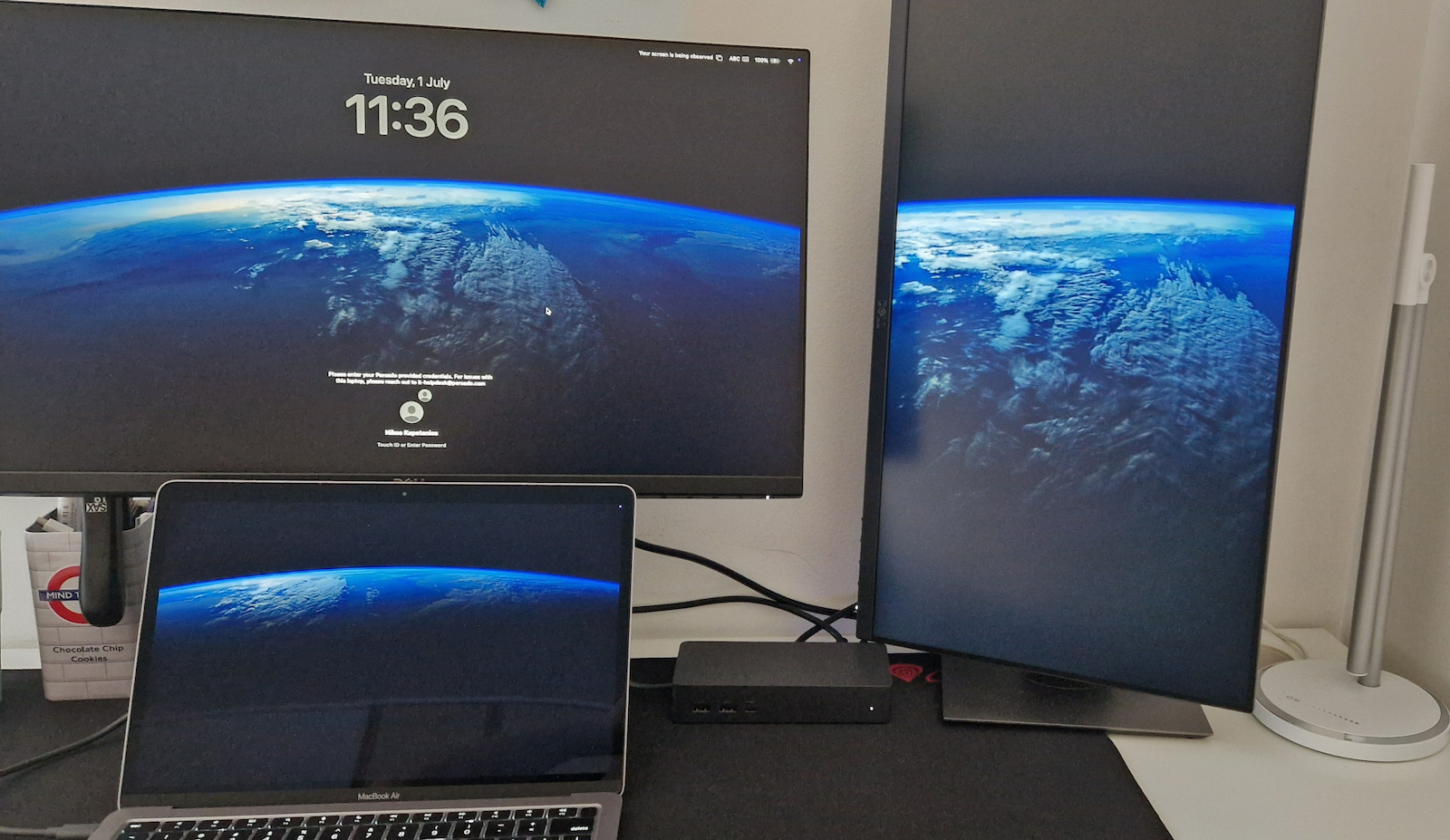
The Dell Docking Station UD22 is aimed at users who are looking for a docking station that offers a comprehensive and easy-to-use solution for connecting their devices to a laptop. The docking station features a variety of connections, including HDMI, DisplayPort, USB-A, and Ethernet ports, so you can connect all your devices with a single USB-C connection.
The Dell Docking Station UD22 is particularly suitable for users who work from home or the office, as it allows them to easily connect all their devices, such as the laptop, monitor, keyboard, mouse, and printer. It is also a good choice for users who travel frequently, as it allows them to easily carry all their devices in a single box.
Universal Connectivity
Connect to any USB-C laptop, regardless of manufacturer, and run any operating system.
Enhance your collaboration spaces with consistent display support across different systems.
Experience fast charging with power delivery of up to 96W for any USB-C laptop.
Next level productivity
Connect your laptop and get started quickly, even when the DisplayLink driver is not installed, thanks to the additional support of the DP Alt mode.
Further enhance the shared workspace experience with DisplayLink's layout provisioning feature, which allows for automatic preset screen layout for users.
Dell Docks now come with their own service tags, along with a 3 to 5-year warranty option for the best possible support, management, and upgradeability.
Connectivity options
Front View
1. USB-A 3.2 Gen 2
2. USB-A 3.2 Gen 2 with PowerShare
3. USB-C 3.2 Gen 2 with PowerShare
Rear View
4. Power In
5. HDMI 2.0
6. DisplayPort 1.2 (2)
7. Gigabit Ethernet RJ45
8. USB-A 3.2 Gen 2 (2)
9. USB 3.2 Gen2 Type-C with DisplayPort 1.4 Alt Mode
Specifications are collected from official manufacturer websites. Please verify the specifications before proceeding with your final purchase. If you notice any problem you can report it here.
I needed it to connect a device that has a type-c connection with increased power supply. It worked normally without any problem. I have not connected any other device.
Το χρειάστηκα για να συνδέσω μια συσκευή η οποία έχει σύνδεση type-c με αυξημένη παροχή ρεύματος. Λειτούργησε κανονικά χωρίς κανένα πρόβλημα. Δεν έχω συνδέσει κάποια άλλη συσκευή.
It's a bit expensive but I feel at ease. It does what it should and does it reliably. MacAir M2 with 2x24' DELL, I've been using it for 2 months now, for my work about 10 hours a day and I have no problems. Also, the convenient usb-c in front for charging my phone.
Είναι λίγο ακριβό αλλά ησύχασα. Κάνει αυτό που πρέπει και το κάνει αξιόπιστα. MacAir M2 με 2x24' DELL, το χρησιμοποιώ τώρα 2 μήνες, για την δουλεία μου περίπου 10 ώρες την μέρα και δεν έχω κανένα πρόβλημα. Επίσης βολική usb-c μπροστά για φόρτιση κινητού.
It was placed on a desk in such a way that the user can bring their (DELL) laptop and with the connection of a single USB-C extension cable, they have access to a (DELL) 24-inch monitor, keyboard/mouse, and USB scanner.
Heavy construction, obviously an indication of quality as it can handle quite a few watts, worked immediately and without problems.
The extension cable (USB-C female => USB-C male) was necessary to conveniently place all the components on this particular desk. It is not from DELL but is 100W / PD compatible / 10Gbps and everything worked without complaints from the laptop.
PS A driver is needed as mentioned in the included instructions...
Η συσκευή είναι όπως ακριβώς περίμενα.
Τοποθετήθηκε σε γραφείο με τρόπο ώστε ο χρήστης να φέρνει το (DELL) laptop του και με σύνδεση ενός μόνο USB-C extension cable να έχει στη διάθεσή του μια (DELL) 24άρα οθόνη, πληκτρολόγιο/ποντίκι και USB scanner.
Βαριά κατασκευή, προφανώς ένδειξη ποιότητας καθώς μπορεί να χειρίζεται αρκετά watts, έπαιξε αμέσως και χωρίς προβλήματα.
Το extension cable (USB-C female => USB-C male) ήταν απαραίτητο ώστε να τοποθετηθούν βολικά όλα τα εξαρτήματα στο συγκεκριμένο γραφείο. Δεν είναι της DELL αλλά είναι 100W / PD compatible / 10Gbps και όλα λειτούργησαν χωρίς διαμαρτυρίες από το laptop.
ΥΓ Χρειάζεται driver όπως αναφέρουν και οι οδηγίες που περιλαμβάνονται...
I needed it to connect a device that has a type-c connection with increased power supply. It worked normally without any problem. I have not connected any other device.
Το χρειάστηκα για να συνδέσω μια συσκευή η οποία έχει σύνδεση type-c με αυξημένη παροχή ρεύματος. Λειτούργησε κανονικά χωρίς κανένα πρόβλημα. Δεν έχω συνδέσει κάποια άλλη συσκευή.
It's a bit expensive but I feel at ease. It does what it should and does it reliably. MacAir M2 with 2x24' DELL, I've been using it for 2 months now, for my work about 10 hours a day and I have no problems. Also, the convenient usb-c in front for charging my phone.
Είναι λίγο ακριβό αλλά ησύχασα. Κάνει αυτό που πρέπει και το κάνει αξιόπιστα. MacAir M2 με 2x24' DELL, το χρησιμοποιώ τώρα 2 μήνες, για την δουλεία μου περίπου 10 ώρες την μέρα και δεν έχω κανένα πρόβλημα. Επίσης βολική usb-c μπροστά για φόρτιση κινητού.
It was placed on a desk in such a way that the user can bring their (DELL) laptop and with the connection of a single USB-C extension cable, they have access to a (DELL) 24-inch monitor, keyboard/mouse, and USB scanner.
Heavy construction, obviously an indication of quality as it can handle quite a few watts, worked immediately and without problems.
The extension cable (USB-C female => USB-C male) was necessary to conveniently place all the components on this particular desk. It is not from DELL but is 100W / PD compatible / 10Gbps and everything worked without complaints from the laptop.
PS A driver is needed as mentioned in the included instructions...
Η συσκευή είναι όπως ακριβώς περίμενα.
Τοποθετήθηκε σε γραφείο με τρόπο ώστε ο χρήστης να φέρνει το (DELL) laptop του και με σύνδεση ενός μόνο USB-C extension cable να έχει στη διάθεσή του μια (DELL) 24άρα οθόνη, πληκτρολόγιο/ποντίκι και USB scanner.
Βαριά κατασκευή, προφανώς ένδειξη ποιότητας καθώς μπορεί να χειρίζεται αρκετά watts, έπαιξε αμέσως και χωρίς προβλήματα.
Το extension cable (USB-C female => USB-C male) ήταν απαραίτητο ώστε να τοποθετηθούν βολικά όλα τα εξαρτήματα στο συγκεκριμένο γραφείο. Δεν είναι της DELL αλλά είναι 100W / PD compatible / 10Gbps και όλα λειτούργησαν χωρίς διαμαρτυρίες από το laptop.
ΥΓ Χρειάζεται driver όπως αναφέρουν και οι οδηγίες που περιλαμβάνονται...
The Dell Docking Station UD22 is aimed at users who are looking for a docking station that offers a comprehensive and easy-to-use solution for connecting their devices to a laptop. The docking station features a variety of connections, including HDMI, DisplayPort, USB-A, and Ethernet ports, so you can connect all your devices with a single USB-C connection.
The Dell Docking Station UD22 is particularly suitable for users who work from home or the office, as it allows them to easily connect all their devices, such as the laptop, monitor, keyboard, mouse, and printer. It is also a good choice for users who travel frequently, as it allows them to easily carry all their devices in a single box.
Universal Connectivity
Connect to any USB-C laptop, regardless of manufacturer, and run any operating system.
Enhance your collaboration spaces with consistent display support across different systems.
Experience fast charging with power delivery of up to 96W for any USB-C laptop.
Next level productivity
Connect your laptop and get started quickly, even when the DisplayLink driver is not installed, thanks to the additional support of the DP Alt mode.
Further enhance the shared workspace experience with DisplayLink's layout provisioning feature, which allows for automatic preset screen layout for users.
Dell Docks now come with their own service tags, along with a 3 to 5-year warranty option for the best possible support, management, and upgradeability.
Connectivity options
Front View
1. USB-A 3.2 Gen 2
2. USB-A 3.2 Gen 2 with PowerShare
3. USB-C 3.2 Gen 2 with PowerShare
Rear View
4. Power In
5. HDMI 2.0
6. DisplayPort 1.2 (2)
7. Gigabit Ethernet RJ45
8. USB-A 3.2 Gen 2 (2)
9. USB 3.2 Gen2 Type-C with DisplayPort 1.4 Alt Mode
Specifications are collected from official manufacturer websites. Please verify the specifications before proceeding with your final purchase. If you notice any problem you can report it here.
I needed it to connect a device that has a type-c connection with increased power supply. It worked normally without any problem. I have not connected any other device.
Το χρειάστηκα για να συνδέσω μια συσκευή η οποία έχει σύνδεση type-c με αυξημένη παροχή ρεύματος. Λειτούργησε κανονικά χωρίς κανένα πρόβλημα. Δεν έχω συνδέσει κάποια άλλη συσκευή.
It's a bit expensive but I feel at ease. It does what it should and does it reliably. MacAir M2 with 2x24' DELL, I've been using it for 2 months now, for my work about 10 hours a day and I have no problems. Also, the convenient usb-c in front for charging my phone.
Είναι λίγο ακριβό αλλά ησύχασα. Κάνει αυτό που πρέπει και το κάνει αξιόπιστα. MacAir M2 με 2x24' DELL, το χρησιμοποιώ τώρα 2 μήνες, για την δουλεία μου περίπου 10 ώρες την μέρα και δεν έχω κανένα πρόβλημα. Επίσης βολική usb-c μπροστά για φόρτιση κινητού.
It was placed on a desk in such a way that the user can bring their (DELL) laptop and with the connection of a single USB-C extension cable, they have access to a (DELL) 24-inch monitor, keyboard/mouse, and USB scanner.
Heavy construction, obviously an indication of quality as it can handle quite a few watts, worked immediately and without problems.
The extension cable (USB-C female => USB-C male) was necessary to conveniently place all the components on this particular desk. It is not from DELL but is 100W / PD compatible / 10Gbps and everything worked without complaints from the laptop.
PS A driver is needed as mentioned in the included instructions...
Η συσκευή είναι όπως ακριβώς περίμενα.
Τοποθετήθηκε σε γραφείο με τρόπο ώστε ο χρήστης να φέρνει το (DELL) laptop του και με σύνδεση ενός μόνο USB-C extension cable να έχει στη διάθεσή του μια (DELL) 24άρα οθόνη, πληκτρολόγιο/ποντίκι και USB scanner.
Βαριά κατασκευή, προφανώς ένδειξη ποιότητας καθώς μπορεί να χειρίζεται αρκετά watts, έπαιξε αμέσως και χωρίς προβλήματα.
Το extension cable (USB-C female => USB-C male) ήταν απαραίτητο ώστε να τοποθετηθούν βολικά όλα τα εξαρτήματα στο συγκεκριμένο γραφείο. Δεν είναι της DELL αλλά είναι 100W / PD compatible / 10Gbps και όλα λειτούργησαν χωρίς διαμαρτυρίες από το laptop.
ΥΓ Χρειάζεται driver όπως αναφέρουν και οι οδηγίες που περιλαμβάνονται...
I needed it to connect a device that has a type-c connection with increased power supply. It worked normally without any problem. I have not connected any other device.
Το χρειάστηκα για να συνδέσω μια συσκευή η οποία έχει σύνδεση type-c με αυξημένη παροχή ρεύματος. Λειτούργησε κανονικά χωρίς κανένα πρόβλημα. Δεν έχω συνδέσει κάποια άλλη συσκευή.
It's a bit expensive but I feel at ease. It does what it should and does it reliably. MacAir M2 with 2x24' DELL, I've been using it for 2 months now, for my work about 10 hours a day and I have no problems. Also, the convenient usb-c in front for charging my phone.
Είναι λίγο ακριβό αλλά ησύχασα. Κάνει αυτό που πρέπει και το κάνει αξιόπιστα. MacAir M2 με 2x24' DELL, το χρησιμοποιώ τώρα 2 μήνες, για την δουλεία μου περίπου 10 ώρες την μέρα και δεν έχω κανένα πρόβλημα. Επίσης βολική usb-c μπροστά για φόρτιση κινητού.
It was placed on a desk in such a way that the user can bring their (DELL) laptop and with the connection of a single USB-C extension cable, they have access to a (DELL) 24-inch monitor, keyboard/mouse, and USB scanner.
Heavy construction, obviously an indication of quality as it can handle quite a few watts, worked immediately and without problems.
The extension cable (USB-C female => USB-C male) was necessary to conveniently place all the components on this particular desk. It is not from DELL but is 100W / PD compatible / 10Gbps and everything worked without complaints from the laptop.
PS A driver is needed as mentioned in the included instructions...
Η συσκευή είναι όπως ακριβώς περίμενα.
Τοποθετήθηκε σε γραφείο με τρόπο ώστε ο χρήστης να φέρνει το (DELL) laptop του και με σύνδεση ενός μόνο USB-C extension cable να έχει στη διάθεσή του μια (DELL) 24άρα οθόνη, πληκτρολόγιο/ποντίκι και USB scanner.
Βαριά κατασκευή, προφανώς ένδειξη ποιότητας καθώς μπορεί να χειρίζεται αρκετά watts, έπαιξε αμέσως και χωρίς προβλήματα.
Το extension cable (USB-C female => USB-C male) ήταν απαραίτητο ώστε να τοποθετηθούν βολικά όλα τα εξαρτήματα στο συγκεκριμένο γραφείο. Δεν είναι της DELL αλλά είναι 100W / PD compatible / 10Gbps και όλα λειτούργησαν χωρίς διαμαρτυρίες από το laptop.
ΥΓ Χρειάζεται driver όπως αναφέρουν και οι οδηγίες που περιλαμβάνονται...