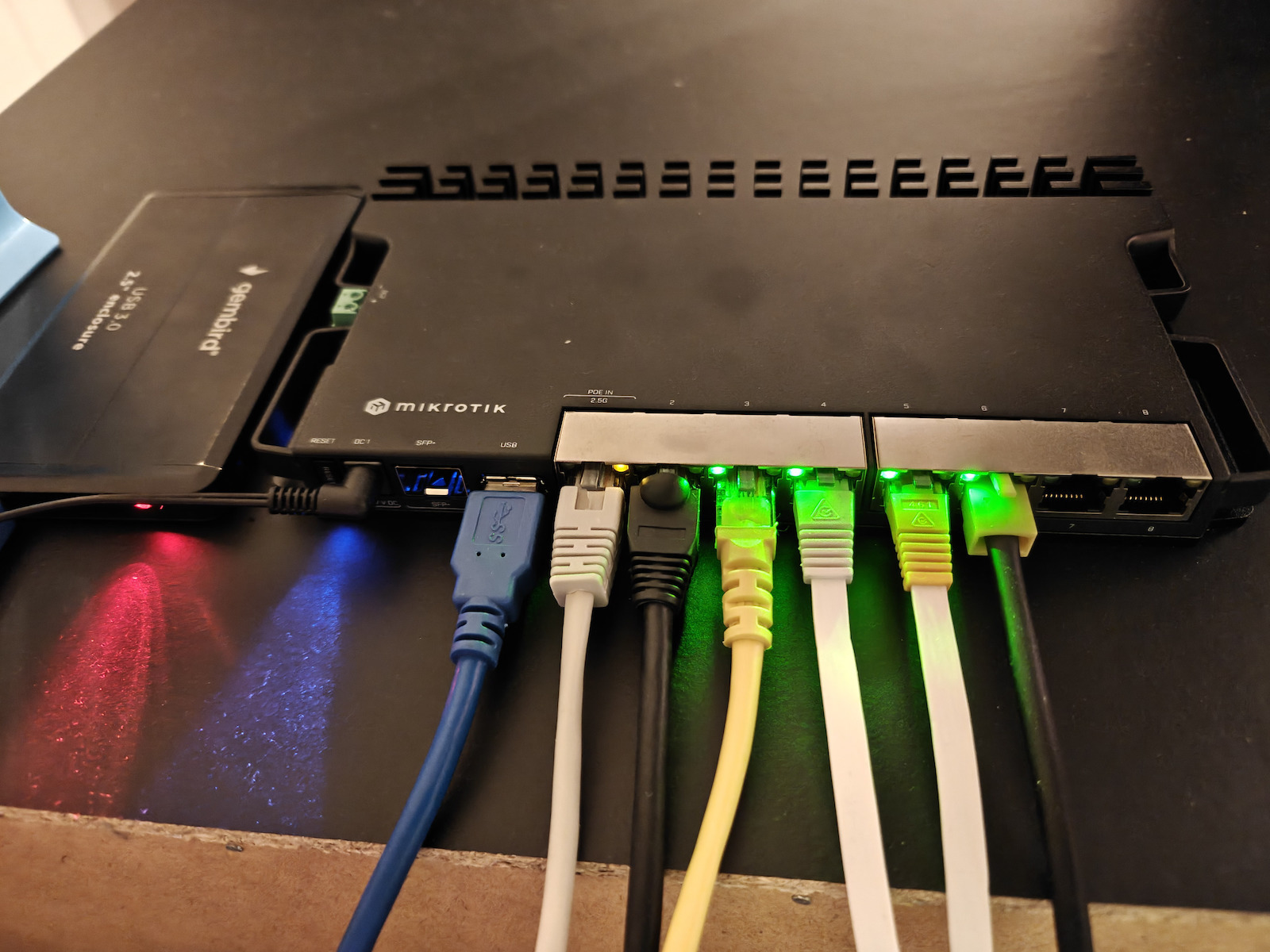
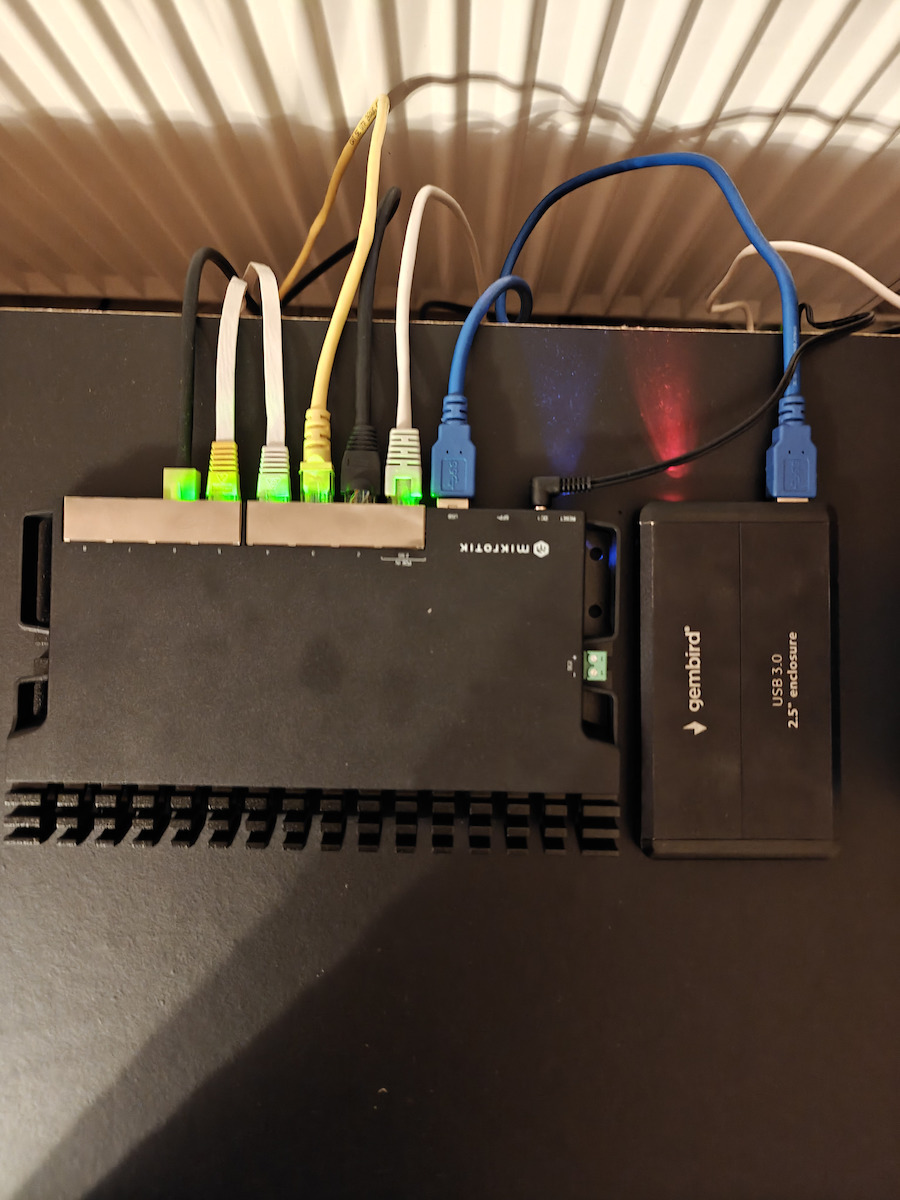
The RB5009 MikroTik is a perfect home router, compact, powerful, with multiple power options and efficient cooling. It features 9 wired ports and USB 3.0. Seven of the ports are Gigabit Ethernet,...
The RB5009 MikroTik is a perfect home router, compact, powerful, with multiple power options and efficient cooling. It features 9 wired ports and USB 3.0. Seven of the ports are Gigabit Ethernet, another is 2.5 Gigabit Ethernet, and the last one is a 10G SFP+ cage. All ports are connected to a powerful Marvell Amethyst family Switch chip with a 10-Gbps...
The RB5009 MikroTik is a perfect home router, compact, powerful, with multiple power options and efficient cooling. It features 9 wired ports and USB 3.0. Seven of the ports are Gigabit Ethernet, another is 2.5 Gigabit Ethernet, and the last one is a 10G SFP+ cage. All ports are connected to a powerful Marvell Amethyst family Switch chip with a 10-Gbps full-duplex line leading to the quad-core Marvell Armada ARMv8 1.4 GHz processor. Both the CPU and the switch-chip are located at the bottom of the board, so the case acts as a heat-sink!
Specifications are collected from official manufacturer websites. Please verify the specifications before proceeding with your final purchase. If you notice any problem you can report it here.
Very powerful router for a demanding home network, home lab, or small business.
I have connected it directly after the ONT, removing Cosmote’s equipment. I use it with Pi-hole, VPN and Wire Guard and so far it has been very stable.
It is not a plug & play device, because RouterOS requires reading and basic networking knowledge. However, if you know what you are doing or want to set up a more serious network properly, it is an excellent choice.
Πολύ δυνατό router για απαιτητικό οικιακό δίκτυο, home lab ή μικρή επιχείρηση.
Το έχω συνδέσει απευθείας μετά το ONT, καταργώντας τον εξοπλισμό της Cosmote. Το χρησιμοποιώ με Pi-hole, VPN και Wire Guard και μέχρι στιγμής είναι πολύ σταθερό.
Δεν είναι plug & play συσκευή, γιατί το RouterOS θέλει διάβασμα και βασικές γνώσεις δικτύων. Αν όμως ξέρεις τι κάνεις ή θέλεις να στήσεις σωστά ένα πιο σοβαρό δίκτυο, είναι εξαιρετική επιλογή.
The MikroTik RB5009 has impressed me from the very first day. Although small in size, it is incredibly powerful and stable. I use it quite "heavily," with containers like Pi-hole, LibreSpeed server, as well as WireGuard VPNs, and everything runs perfectly without any hiccups.
In practice, no matter how hard I tried, the CPU reached at most 55%, which shows how efficient its hardware is.
Το MikroTik RB5009 με έχει εντυπωσιάσει από την πρώτη μέρα. Παρότι μικρό σε μέγεθος, είναι απίστευτα δυνατό και σταθερό. Το χρησιμοποιώ αρκετά «βαριά», με containers όπως Pi‑hole, LibreSpeed server, καθώς και WireGuard VPNs, και όλα τρέχουν άψογα χωρίς κολλήματα.
Στην πράξη, όσο κι αν προσπάθησα, η CPU έφτασε το πολύ 55%, κάτι που δείχνει πόσο αποδοτικό είναι το hardware του.
What the machine does has been said by others.
5 stars easily from me.
.
I will only mention what I did and what I couldn't do with other routers (DrayTek) costing €150.
1) Extremely fast in gaming and with excellent QoS setup for bufferbloat. I see pings that my line has never seen before, and at the same time, I can do a speed test without any load of even 1ms.
2) Full compatibility even with the tricky FTTH from Nova. I have completely eliminated the provider's equipment, and still, I have internet, telephony (via ATA), and softphone on Windows.
3) Full CLI support. I can automate whatever I want (e.g., Wake-On-Lan).
4) I can have my setup not only in binary but also in text format so I can replicate my settings in the future and check what has changed since the last time.
.
Yes, it is harder to set up, but if you can't do it yourself, it's worth giving €50 to a technician to set it up for you.
.
P.S.
My only complaint is that MikroTik refuses to implement broadcast relay between different VLANs. This is not an issue with this specific model but a broader philosophical issue with MikroTik. I bypassed this by adding an ERX to the network just to do this job.
Το τι κάνει το μηχάνημα το έχουν πει και άλλοι.
5 αστέρια εύκολα από εμένα.
.
Θα πω μόνο αυτά που έκανα και που δεν μπορούσα να κάνω με άλλους router (DrayTek) των 150€
1) Υπερβολικά γρήγορος σε gaming και με εξαιρετικό σετάρισμα σε QoS για bufferbloat. Βλέπω ping που στην γραμμή μου δεν έχουν ξαναδεί τα μάτια μου και ταυτόχρονα κάνω και speedtest χωρίς να έχω επιβάρυνση ούτε 1ms
2) Πλήρης συμβατότητα ακόμα και με το δύστροπο FTTH της Nova. Έχω καταργήσει εντελώς τον εξοπλισμό του παρόχου και παρόλα αυτά έχω Internet, τηλεφωνία (μέσω ATA) αλλά και softphone στα Windows
3) Πλήρες CLI support. Μπορώ να αυτοματοποιήσω ότι θέλω (πχ Wake-On-Lan)
4) Μπορώ να έχω το setup μου εκτός από binary και σε text format για να μπορώ να επαναλάβω στο μέλλον τις ρυθμίσεις μου αλλά και για να τσεκάρω το τι έχει αλλάξει από την τελευταία φορά.
.
Ναι είναι πιο δύσκολο να το στήσεις αλλά αν δεν μπορείς μόνος σου αξίζει που λέει ο λόγος να δώσεις 50 ευρώ σε κάποιον τεχνικό να στο σετάρει.
.
ΥΓ
Το μόνο μου παράπονο είναι ότι η MikroTik αρνείται να υλοποιήσει broadcast relay ανάμεσα σε διάφορα VLAN.
Αυτό δεν είναι πρόβλημα που έχει το συγκεκριμένο μοντέλο αλλά είναι γενικότερο θέμα φιλοσοφίας της MikroTik.
Το προσπέρασα προσθέτοντας έναν ERX στο δίκτυο μόνο και μόνο για να κάνει αυτή τη δουλειά.
The machine is simply very powerful. We got it at a beach bar with a lot of people from the beginning of summer, it worked perfectly and didn't get stuck at all. Extremely satisfied as in its previous case (I had an older model). Of course, you need to deal with the technical part, otherwise, it's better to have a technician set it up for you, but this obviously happens with every device! I recommend it!
Το μηχάνημα είναι απλά πολύ δυνατό. Το πήραμε σε beach bar με αρκετό κόσμο από τις αρχές περίπου του καλοκαιριού, δούλεψε άψογα και δεν κολλούσε καθόλου. Εξαιρετικά ευχαριστημένος όπως και στην προηγούμενη περίπτωσή του (είχα παλαιότερο μοντέλο). Χρειάζεται να ασχοληθείς φυσικά με το τεχνικό κομμάτι, αλλιώς να στο στήσει καλύτερα ένας τεχνικός, αλλά αυτό προφανώς συμβαίνει σε κάθε συσκευή! Το συνιστώ!
My first contact with MikroTik and RouterOS. I will repeat what applies to all MikroTik products, it is a very big school and it puts you abruptly in the world of networks, it requires a lot of reading and involvement to set it up, good contact with the terminal, although there is also the WinBox application which can run with Wine and on non-Windows Operating Systems.
I have had it for about a month and I have managed the following:
1. Set up VLANs in the network to separate traffic between smart devices (smart switches, washing machines, etc.), the standard network of personal devices, and some corporate servers and laptops, in collaboration with some managed switches.
2. Put the provider's router in bridge mode and make the pppoe connection through the Mikrotik.
3. Reduce bufferbloat from rank D to A directly with the installation of Mikrotik, and then to A+ by enabling SFQ queues. Now the line does not "clog" no matter what happens simultaneously, with downloading, multiple streaming, and the ping remains low at 3-10ms.
4. Wireguard VPN connection to a known VPN provider, with routing rules that send only the traffic from specific devices (e.g. Smart TV) to a secondary routing table for wireguard traffic, in combination with firewall rules that block ipv6 traffic and assign specific DNS servers of the VPN provider to avoid DNS leaks.
5. Setting up a LAG group with 4 ethernet connections between the Mikrotik and the central switch, in order to have traffic balancing and not create a bottleneck for the entire network through 1 ethernet connection.
Things I am working on and have not yet managed to set up correctly:
1. Load Balancing between the fiber optic router and another router with a 4G connection that does not support bridge mode.
2. Using the VPN tunnel only for traffic to specific hostnames/websites - maintaining a dynamic list of IP addresses that resolve to those specific hostnames through a script that runs periodically.
In general, it has a very sturdy construction, does not heat up much, does not make noise, and has very good specs both in computing power and in the number of connections it supports. It is highly recommended for power users who want to upgrade their network and have absolute control over their traffic.
Η πρώτη μου επαφή με MikroTik και RouterOS. Θα επαναλάβω αυτό που ισχύει για όλα τα MikroTik προϊόντα, είναι πολύ μεγάλο σχολείο και σε βάζει απότομα στον κόσμο των δικτύων, χρειάζεται πολύ διάβασμα και ενασχόληση για να στηθεί, καλή επαφή με το terminal, αν και υπάρχει και η εφαρμογή WinBox η οποία μπορεί να τρέξει με Wine και σε non-Windows Operating Systems.
Το έχω στην κατοχή μου περίπου ένα μήνα και έχω καταφέρει τα παρακάτω:
1. Να στήσω VLANs στο δίκτυο για να διαχωρίσω το traffic μεταξύ των smart devices (smart switches, πλυντήρια, κλπ), του standard δικτύου των προσωπικών συσκευών, και κάποιων εταιρικών servers και λάπτοπς, σε συνεργασία με κάποια managed switches.
2. Να βάλω το router του παρόχου σε bridge mode και να κάνω το pppoe connection μέσω του Mikrotik.
3. Μείωση του bufferbloat από rank D σε Α απευθείας με την εγκατάσταση του Mikrotik, και μετα σε A+ με την ενεργοποίηση των SFQ queues. Πλέον η γραμμή δεν "μπουκώνει" ότι κι αν συμβαίνει ταυτόχρονα, με downloading, πολλαπλά streaming και το ping να παραμένει χαμηλά σε 3-10ms.
4. Wireguard VPN connection σε γνωστό VPN πάροχο, με routing rules που στέλνουν σε δευτερεύων routing table για το wireguard traffic μόνο την κίνηση από συγκεκριμένες συσκευές (πχ Smart TV), σε συνδυασμό με firewall rules που μπλοκάρουν το ipv6 traffic και με ανάθεση συγκεκριμένων DNS servers του VPN παρόχου για να μην υπάρχει DNS leak.
5. Στήσιμο ενός LAG group με 4 ethernet connections μεταξύ του Mikrotik και του κεντρικού switch, ώστε να υπάρχει balancing του traffic και να μην γίνεται bottleneck όλο το δίκτυο μέσα από 1 ethernet connection.
Αυτά που δουλεύω και δεν έχω καταφέρει ακόμα να στήσω σωστά:
1. Load Balancing μεταξύ του router της οπτικής ίνας και ενός άλλου router με 4G connection το οποίο δεν υποστηρίζει bridge mode.
2. Χρήση του VPN tunnel μόνο για traffic προς συγκεκριμένα hostnames/websites - συντηρώντας μια δυναμική λίστα από ip addresses στα οποία κάνουν resolve τα συγκεκριμένα hostnames μέσω ενός script που τρέχει περιοδικά.
Σε γενικές γραμμές είναι πολύ στιβαρή κατασκευή, δεν ζεσταίνεται ιδιαίτερα, δεν κάνει θόρυβο, και διαθέτει πολύ καλά specs και σε υπολογιστική ισχύ αλλά και σε connections που υποστηρίζει. Συστήνεται ανεπιφύλακτα στον power user που θέλει να αναβαθμίσει το δίκτυο του και να έχει απόλυτο έλεγχο στο traffic του.
Very powerful router for a demanding home network, home lab, or small business.
I have connected it directly after the ONT, removing Cosmote’s equipment. I use it with Pi-hole, VPN and Wire Guard and so far it has been very stable.
It is not a plug & play device, because RouterOS requires reading and basic networking knowledge. However, if you know what you are doing or want to set up a more serious network properly, it is an excellent choice.
Πολύ δυνατό router για απαιτητικό οικιακό δίκτυο, home lab ή μικρή επιχείρηση.
Το έχω συνδέσει απευθείας μετά το ONT, καταργώντας τον εξοπλισμό της Cosmote. Το χρησιμοποιώ με Pi-hole, VPN και Wire Guard και μέχρι στιγμής είναι πολύ σταθερό.
Δεν είναι plug & play συσκευή, γιατί το RouterOS θέλει διάβασμα και βασικές γνώσεις δικτύων. Αν όμως ξέρεις τι κάνεις ή θέλεις να στήσεις σωστά ένα πιο σοβαρό δίκτυο, είναι εξαιρετική επιλογή.
The MikroTik RB5009 has impressed me from the very first day. Although small in size, it is incredibly powerful and stable. I use it quite "heavily," with containers like Pi-hole, LibreSpeed server, as well as WireGuard VPNs, and everything runs perfectly without any hiccups.
In practice, no matter how hard I tried, the CPU reached at most 55%, which shows how efficient its hardware is.
Το MikroTik RB5009 με έχει εντυπωσιάσει από την πρώτη μέρα. Παρότι μικρό σε μέγεθος, είναι απίστευτα δυνατό και σταθερό. Το χρησιμοποιώ αρκετά «βαριά», με containers όπως Pi‑hole, LibreSpeed server, καθώς και WireGuard VPNs, και όλα τρέχουν άψογα χωρίς κολλήματα.
Στην πράξη, όσο κι αν προσπάθησα, η CPU έφτασε το πολύ 55%, κάτι που δείχνει πόσο αποδοτικό είναι το hardware του.
What the machine does has been said by others.
5 stars easily from me.
.
I will only mention what I did and what I couldn't do with other routers (DrayTek) costing €150.
1) Extremely fast in gaming and with excellent QoS setup for bufferbloat. I see pings that my line has never seen before, and at the same time, I can do a speed test without any load of even 1ms.
2) Full compatibility even with the tricky FTTH from Nova. I have completely eliminated the provider's equipment, and still, I have internet, telephony (via ATA), and softphone on Windows.
3) Full CLI support. I can automate whatever I want (e.g., Wake-On-Lan).
4) I can have my setup not only in binary but also in text format so I can replicate my settings in the future and check what has changed since the last time.
.
Yes, it is harder to set up, but if you can't do it yourself, it's worth giving €50 to a technician to set it up for you.
.
P.S.
My only complaint is that MikroTik refuses to implement broadcast relay between different VLANs. This is not an issue with this specific model but a broader philosophical issue with MikroTik. I bypassed this by adding an ERX to the network just to do this job.
Το τι κάνει το μηχάνημα το έχουν πει και άλλοι.
5 αστέρια εύκολα από εμένα.
.
Θα πω μόνο αυτά που έκανα και που δεν μπορούσα να κάνω με άλλους router (DrayTek) των 150€
1) Υπερβολικά γρήγορος σε gaming και με εξαιρετικό σετάρισμα σε QoS για bufferbloat. Βλέπω ping που στην γραμμή μου δεν έχουν ξαναδεί τα μάτια μου και ταυτόχρονα κάνω και speedtest χωρίς να έχω επιβάρυνση ούτε 1ms
2) Πλήρης συμβατότητα ακόμα και με το δύστροπο FTTH της Nova. Έχω καταργήσει εντελώς τον εξοπλισμό του παρόχου και παρόλα αυτά έχω Internet, τηλεφωνία (μέσω ATA) αλλά και softphone στα Windows
3) Πλήρες CLI support. Μπορώ να αυτοματοποιήσω ότι θέλω (πχ Wake-On-Lan)
4) Μπορώ να έχω το setup μου εκτός από binary και σε text format για να μπορώ να επαναλάβω στο μέλλον τις ρυθμίσεις μου αλλά και για να τσεκάρω το τι έχει αλλάξει από την τελευταία φορά.
.
Ναι είναι πιο δύσκολο να το στήσεις αλλά αν δεν μπορείς μόνος σου αξίζει που λέει ο λόγος να δώσεις 50 ευρώ σε κάποιον τεχνικό να στο σετάρει.
.
ΥΓ
Το μόνο μου παράπονο είναι ότι η MikroTik αρνείται να υλοποιήσει broadcast relay ανάμεσα σε διάφορα VLAN.
Αυτό δεν είναι πρόβλημα που έχει το συγκεκριμένο μοντέλο αλλά είναι γενικότερο θέμα φιλοσοφίας της MikroTik.
Το προσπέρασα προσθέτοντας έναν ERX στο δίκτυο μόνο και μόνο για να κάνει αυτή τη δουλειά.
The machine is simply very powerful. We got it at a beach bar with a lot of people from the beginning of summer, it worked perfectly and didn't get stuck at all. Extremely satisfied as in its previous case (I had an older model). Of course, you need to deal with the technical part, otherwise, it's better to have a technician set it up for you, but this obviously happens with every device! I recommend it!
Το μηχάνημα είναι απλά πολύ δυνατό. Το πήραμε σε beach bar με αρκετό κόσμο από τις αρχές περίπου του καλοκαιριού, δούλεψε άψογα και δεν κολλούσε καθόλου. Εξαιρετικά ευχαριστημένος όπως και στην προηγούμενη περίπτωσή του (είχα παλαιότερο μοντέλο). Χρειάζεται να ασχοληθείς φυσικά με το τεχνικό κομμάτι, αλλιώς να στο στήσει καλύτερα ένας τεχνικός, αλλά αυτό προφανώς συμβαίνει σε κάθε συσκευή! Το συνιστώ!
My first contact with MikroTik and RouterOS. I will repeat what applies to all MikroTik products, it is a very big school and it puts you abruptly in the world of networks, it requires a lot of reading and involvement to set it up, good contact with the terminal, although there is also the WinBox application which can run with Wine and on non-Windows Operating Systems.
I have had it for about a month and I have managed the following:
1. Set up VLANs in the network to separate traffic between smart devices (smart switches, washing machines, etc.), the standard network of personal devices, and some corporate servers and laptops, in collaboration with some managed switches.
2. Put the provider's router in bridge mode and make the pppoe connection through the Mikrotik.
3. Reduce bufferbloat from rank D to A directly with the installation of Mikrotik, and then to A+ by enabling SFQ queues. Now the line does not "clog" no matter what happens simultaneously, with downloading, multiple streaming, and the ping remains low at 3-10ms.
4. Wireguard VPN connection to a known VPN provider, with routing rules that send only the traffic from specific devices (e.g. Smart TV) to a secondary routing table for wireguard traffic, in combination with firewall rules that block ipv6 traffic and assign specific DNS servers of the VPN provider to avoid DNS leaks.
5. Setting up a LAG group with 4 ethernet connections between the Mikrotik and the central switch, in order to have traffic balancing and not create a bottleneck for the entire network through 1 ethernet connection.
Things I am working on and have not yet managed to set up correctly:
1. Load Balancing between the fiber optic router and another router with a 4G connection that does not support bridge mode.
2. Using the VPN tunnel only for traffic to specific hostnames/websites - maintaining a dynamic list of IP addresses that resolve to those specific hostnames through a script that runs periodically.
In general, it has a very sturdy construction, does not heat up much, does not make noise, and has very good specs both in computing power and in the number of connections it supports. It is highly recommended for power users who want to upgrade their network and have absolute control over their traffic.
Η πρώτη μου επαφή με MikroTik και RouterOS. Θα επαναλάβω αυτό που ισχύει για όλα τα MikroTik προϊόντα, είναι πολύ μεγάλο σχολείο και σε βάζει απότομα στον κόσμο των δικτύων, χρειάζεται πολύ διάβασμα και ενασχόληση για να στηθεί, καλή επαφή με το terminal, αν και υπάρχει και η εφαρμογή WinBox η οποία μπορεί να τρέξει με Wine και σε non-Windows Operating Systems.
Το έχω στην κατοχή μου περίπου ένα μήνα και έχω καταφέρει τα παρακάτω:
1. Να στήσω VLANs στο δίκτυο για να διαχωρίσω το traffic μεταξύ των smart devices (smart switches, πλυντήρια, κλπ), του standard δικτύου των προσωπικών συσκευών, και κάποιων εταιρικών servers και λάπτοπς, σε συνεργασία με κάποια managed switches.
2. Να βάλω το router του παρόχου σε bridge mode και να κάνω το pppoe connection μέσω του Mikrotik.
3. Μείωση του bufferbloat από rank D σε Α απευθείας με την εγκατάσταση του Mikrotik, και μετα σε A+ με την ενεργοποίηση των SFQ queues. Πλέον η γραμμή δεν "μπουκώνει" ότι κι αν συμβαίνει ταυτόχρονα, με downloading, πολλαπλά streaming και το ping να παραμένει χαμηλά σε 3-10ms.
4. Wireguard VPN connection σε γνωστό VPN πάροχο, με routing rules που στέλνουν σε δευτερεύων routing table για το wireguard traffic μόνο την κίνηση από συγκεκριμένες συσκευές (πχ Smart TV), σε συνδυασμό με firewall rules που μπλοκάρουν το ipv6 traffic και με ανάθεση συγκεκριμένων DNS servers του VPN παρόχου για να μην υπάρχει DNS leak.
5. Στήσιμο ενός LAG group με 4 ethernet connections μεταξύ του Mikrotik και του κεντρικού switch, ώστε να υπάρχει balancing του traffic και να μην γίνεται bottleneck όλο το δίκτυο μέσα από 1 ethernet connection.
Αυτά που δουλεύω και δεν έχω καταφέρει ακόμα να στήσω σωστά:
1. Load Balancing μεταξύ του router της οπτικής ίνας και ενός άλλου router με 4G connection το οποίο δεν υποστηρίζει bridge mode.
2. Χρήση του VPN tunnel μόνο για traffic προς συγκεκριμένα hostnames/websites - συντηρώντας μια δυναμική λίστα από ip addresses στα οποία κάνουν resolve τα συγκεκριμένα hostnames μέσω ενός script που τρέχει περιοδικά.
Σε γενικές γραμμές είναι πολύ στιβαρή κατασκευή, δεν ζεσταίνεται ιδιαίτερα, δεν κάνει θόρυβο, και διαθέτει πολύ καλά specs και σε υπολογιστική ισχύ αλλά και σε connections που υποστηρίζει. Συστήνεται ανεπιφύλακτα στον power user που θέλει να αναβαθμίσει το δίκτυο του και να έχει απόλυτο έλεγχο στο traffic του.
The RB5009 MikroTik is a perfect home router, compact, powerful, with multiple power options and efficient cooling. It features 9 wired ports and USB 3.0. Seven of the ports are Gigabit Ethernet, another is 2.5 Gigabit Ethernet, and the last one is a 10G SFP+ cage. All ports are connected to a powerful Marvell Amethyst family Switch chip with a 10-Gbps full-duplex line leading to the quad-core Marvell Armada ARMv8 1.4 GHz processor. Both the CPU and the switch-chip are located at the bottom of the board, so the case acts as a heat-sink!
Specifications are collected from official manufacturer websites. Please verify the specifications before proceeding with your final purchase. If you notice any problem you can report it here.
Very powerful router for a demanding home network, home lab, or small business.
I have connected it directly after the ONT, removing Cosmote’s equipment. I use it with Pi-hole, VPN and Wire Guard and so far it has been very stable.
It is not a plug & play device, because RouterOS requires reading and basic networking knowledge. However, if you know what you are doing or want to set up a more serious network properly, it is an excellent choice.
Πολύ δυνατό router για απαιτητικό οικιακό δίκτυο, home lab ή μικρή επιχείρηση.
Το έχω συνδέσει απευθείας μετά το ONT, καταργώντας τον εξοπλισμό της Cosmote. Το χρησιμοποιώ με Pi-hole, VPN και Wire Guard και μέχρι στιγμής είναι πολύ σταθερό.
Δεν είναι plug & play συσκευή, γιατί το RouterOS θέλει διάβασμα και βασικές γνώσεις δικτύων. Αν όμως ξέρεις τι κάνεις ή θέλεις να στήσεις σωστά ένα πιο σοβαρό δίκτυο, είναι εξαιρετική επιλογή.
The MikroTik RB5009 has impressed me from the very first day. Although small in size, it is incredibly powerful and stable. I use it quite "heavily," with containers like Pi-hole, LibreSpeed server, as well as WireGuard VPNs, and everything runs perfectly without any hiccups.
In practice, no matter how hard I tried, the CPU reached at most 55%, which shows how efficient its hardware is.
Το MikroTik RB5009 με έχει εντυπωσιάσει από την πρώτη μέρα. Παρότι μικρό σε μέγεθος, είναι απίστευτα δυνατό και σταθερό. Το χρησιμοποιώ αρκετά «βαριά», με containers όπως Pi‑hole, LibreSpeed server, καθώς και WireGuard VPNs, και όλα τρέχουν άψογα χωρίς κολλήματα.
Στην πράξη, όσο κι αν προσπάθησα, η CPU έφτασε το πολύ 55%, κάτι που δείχνει πόσο αποδοτικό είναι το hardware του.
What the machine does has been said by others.
5 stars easily from me.
.
I will only mention what I did and what I couldn't do with other routers (DrayTek) costing €150.
1) Extremely fast in gaming and with excellent QoS setup for bufferbloat. I see pings that my line has never seen before, and at the same time, I can do a speed test without any load of even 1ms.
2) Full compatibility even with the tricky FTTH from Nova. I have completely eliminated the provider's equipment, and still, I have internet, telephony (via ATA), and softphone on Windows.
3) Full CLI support. I can automate whatever I want (e.g., Wake-On-Lan).
4) I can have my setup not only in binary but also in text format so I can replicate my settings in the future and check what has changed since the last time.
.
Yes, it is harder to set up, but if you can't do it yourself, it's worth giving €50 to a technician to set it up for you.
.
P.S.
My only complaint is that MikroTik refuses to implement broadcast relay between different VLANs. This is not an issue with this specific model but a broader philosophical issue with MikroTik. I bypassed this by adding an ERX to the network just to do this job.
Το τι κάνει το μηχάνημα το έχουν πει και άλλοι.
5 αστέρια εύκολα από εμένα.
.
Θα πω μόνο αυτά που έκανα και που δεν μπορούσα να κάνω με άλλους router (DrayTek) των 150€
1) Υπερβολικά γρήγορος σε gaming και με εξαιρετικό σετάρισμα σε QoS για bufferbloat. Βλέπω ping που στην γραμμή μου δεν έχουν ξαναδεί τα μάτια μου και ταυτόχρονα κάνω και speedtest χωρίς να έχω επιβάρυνση ούτε 1ms
2) Πλήρης συμβατότητα ακόμα και με το δύστροπο FTTH της Nova. Έχω καταργήσει εντελώς τον εξοπλισμό του παρόχου και παρόλα αυτά έχω Internet, τηλεφωνία (μέσω ATA) αλλά και softphone στα Windows
3) Πλήρες CLI support. Μπορώ να αυτοματοποιήσω ότι θέλω (πχ Wake-On-Lan)
4) Μπορώ να έχω το setup μου εκτός από binary και σε text format για να μπορώ να επαναλάβω στο μέλλον τις ρυθμίσεις μου αλλά και για να τσεκάρω το τι έχει αλλάξει από την τελευταία φορά.
.
Ναι είναι πιο δύσκολο να το στήσεις αλλά αν δεν μπορείς μόνος σου αξίζει που λέει ο λόγος να δώσεις 50 ευρώ σε κάποιον τεχνικό να στο σετάρει.
.
ΥΓ
Το μόνο μου παράπονο είναι ότι η MikroTik αρνείται να υλοποιήσει broadcast relay ανάμεσα σε διάφορα VLAN.
Αυτό δεν είναι πρόβλημα που έχει το συγκεκριμένο μοντέλο αλλά είναι γενικότερο θέμα φιλοσοφίας της MikroTik.
Το προσπέρασα προσθέτοντας έναν ERX στο δίκτυο μόνο και μόνο για να κάνει αυτή τη δουλειά.
The machine is simply very powerful. We got it at a beach bar with a lot of people from the beginning of summer, it worked perfectly and didn't get stuck at all. Extremely satisfied as in its previous case (I had an older model). Of course, you need to deal with the technical part, otherwise, it's better to have a technician set it up for you, but this obviously happens with every device! I recommend it!
Το μηχάνημα είναι απλά πολύ δυνατό. Το πήραμε σε beach bar με αρκετό κόσμο από τις αρχές περίπου του καλοκαιριού, δούλεψε άψογα και δεν κολλούσε καθόλου. Εξαιρετικά ευχαριστημένος όπως και στην προηγούμενη περίπτωσή του (είχα παλαιότερο μοντέλο). Χρειάζεται να ασχοληθείς φυσικά με το τεχνικό κομμάτι, αλλιώς να στο στήσει καλύτερα ένας τεχνικός, αλλά αυτό προφανώς συμβαίνει σε κάθε συσκευή! Το συνιστώ!
My first contact with MikroTik and RouterOS. I will repeat what applies to all MikroTik products, it is a very big school and it puts you abruptly in the world of networks, it requires a lot of reading and involvement to set it up, good contact with the terminal, although there is also the WinBox application which can run with Wine and on non-Windows Operating Systems.
I have had it for about a month and I have managed the following:
1. Set up VLANs in the network to separate traffic between smart devices (smart switches, washing machines, etc.), the standard network of personal devices, and some corporate servers and laptops, in collaboration with some managed switches.
2. Put the provider's router in bridge mode and make the pppoe connection through the Mikrotik.
3. Reduce bufferbloat from rank D to A directly with the installation of Mikrotik, and then to A+ by enabling SFQ queues. Now the line does not "clog" no matter what happens simultaneously, with downloading, multiple streaming, and the ping remains low at 3-10ms.
4. Wireguard VPN connection to a known VPN provider, with routing rules that send only the traffic from specific devices (e.g. Smart TV) to a secondary routing table for wireguard traffic, in combination with firewall rules that block ipv6 traffic and assign specific DNS servers of the VPN provider to avoid DNS leaks.
5. Setting up a LAG group with 4 ethernet connections between the Mikrotik and the central switch, in order to have traffic balancing and not create a bottleneck for the entire network through 1 ethernet connection.
Things I am working on and have not yet managed to set up correctly:
1. Load Balancing between the fiber optic router and another router with a 4G connection that does not support bridge mode.
2. Using the VPN tunnel only for traffic to specific hostnames/websites - maintaining a dynamic list of IP addresses that resolve to those specific hostnames through a script that runs periodically.
In general, it has a very sturdy construction, does not heat up much, does not make noise, and has very good specs both in computing power and in the number of connections it supports. It is highly recommended for power users who want to upgrade their network and have absolute control over their traffic.
Η πρώτη μου επαφή με MikroTik και RouterOS. Θα επαναλάβω αυτό που ισχύει για όλα τα MikroTik προϊόντα, είναι πολύ μεγάλο σχολείο και σε βάζει απότομα στον κόσμο των δικτύων, χρειάζεται πολύ διάβασμα και ενασχόληση για να στηθεί, καλή επαφή με το terminal, αν και υπάρχει και η εφαρμογή WinBox η οποία μπορεί να τρέξει με Wine και σε non-Windows Operating Systems.
Το έχω στην κατοχή μου περίπου ένα μήνα και έχω καταφέρει τα παρακάτω:
1. Να στήσω VLANs στο δίκτυο για να διαχωρίσω το traffic μεταξύ των smart devices (smart switches, πλυντήρια, κλπ), του standard δικτύου των προσωπικών συσκευών, και κάποιων εταιρικών servers και λάπτοπς, σε συνεργασία με κάποια managed switches.
2. Να βάλω το router του παρόχου σε bridge mode και να κάνω το pppoe connection μέσω του Mikrotik.
3. Μείωση του bufferbloat από rank D σε Α απευθείας με την εγκατάσταση του Mikrotik, και μετα σε A+ με την ενεργοποίηση των SFQ queues. Πλέον η γραμμή δεν "μπουκώνει" ότι κι αν συμβαίνει ταυτόχρονα, με downloading, πολλαπλά streaming και το ping να παραμένει χαμηλά σε 3-10ms.
4. Wireguard VPN connection σε γνωστό VPN πάροχο, με routing rules που στέλνουν σε δευτερεύων routing table για το wireguard traffic μόνο την κίνηση από συγκεκριμένες συσκευές (πχ Smart TV), σε συνδυασμό με firewall rules που μπλοκάρουν το ipv6 traffic και με ανάθεση συγκεκριμένων DNS servers του VPN παρόχου για να μην υπάρχει DNS leak.
5. Στήσιμο ενός LAG group με 4 ethernet connections μεταξύ του Mikrotik και του κεντρικού switch, ώστε να υπάρχει balancing του traffic και να μην γίνεται bottleneck όλο το δίκτυο μέσα από 1 ethernet connection.
Αυτά που δουλεύω και δεν έχω καταφέρει ακόμα να στήσω σωστά:
1. Load Balancing μεταξύ του router της οπτικής ίνας και ενός άλλου router με 4G connection το οποίο δεν υποστηρίζει bridge mode.
2. Χρήση του VPN tunnel μόνο για traffic προς συγκεκριμένα hostnames/websites - συντηρώντας μια δυναμική λίστα από ip addresses στα οποία κάνουν resolve τα συγκεκριμένα hostnames μέσω ενός script που τρέχει περιοδικά.
Σε γενικές γραμμές είναι πολύ στιβαρή κατασκευή, δεν ζεσταίνεται ιδιαίτερα, δεν κάνει θόρυβο, και διαθέτει πολύ καλά specs και σε υπολογιστική ισχύ αλλά και σε connections που υποστηρίζει. Συστήνεται ανεπιφύλακτα στον power user που θέλει να αναβαθμίσει το δίκτυο του και να έχει απόλυτο έλεγχο στο traffic του.
Very powerful router for a demanding home network, home lab, or small business.
I have connected it directly after the ONT, removing Cosmote’s equipment. I use it with Pi-hole, VPN and Wire Guard and so far it has been very stable.
It is not a plug & play device, because RouterOS requires reading and basic networking knowledge. However, if you know what you are doing or want to set up a more serious network properly, it is an excellent choice.
Πολύ δυνατό router για απαιτητικό οικιακό δίκτυο, home lab ή μικρή επιχείρηση.
Το έχω συνδέσει απευθείας μετά το ONT, καταργώντας τον εξοπλισμό της Cosmote. Το χρησιμοποιώ με Pi-hole, VPN και Wire Guard και μέχρι στιγμής είναι πολύ σταθερό.
Δεν είναι plug & play συσκευή, γιατί το RouterOS θέλει διάβασμα και βασικές γνώσεις δικτύων. Αν όμως ξέρεις τι κάνεις ή θέλεις να στήσεις σωστά ένα πιο σοβαρό δίκτυο, είναι εξαιρετική επιλογή.
The MikroTik RB5009 has impressed me from the very first day. Although small in size, it is incredibly powerful and stable. I use it quite "heavily," with containers like Pi-hole, LibreSpeed server, as well as WireGuard VPNs, and everything runs perfectly without any hiccups.
In practice, no matter how hard I tried, the CPU reached at most 55%, which shows how efficient its hardware is.
Το MikroTik RB5009 με έχει εντυπωσιάσει από την πρώτη μέρα. Παρότι μικρό σε μέγεθος, είναι απίστευτα δυνατό και σταθερό. Το χρησιμοποιώ αρκετά «βαριά», με containers όπως Pi‑hole, LibreSpeed server, καθώς και WireGuard VPNs, και όλα τρέχουν άψογα χωρίς κολλήματα.
Στην πράξη, όσο κι αν προσπάθησα, η CPU έφτασε το πολύ 55%, κάτι που δείχνει πόσο αποδοτικό είναι το hardware του.
What the machine does has been said by others.
5 stars easily from me.
.
I will only mention what I did and what I couldn't do with other routers (DrayTek) costing €150.
1) Extremely fast in gaming and with excellent QoS setup for bufferbloat. I see pings that my line has never seen before, and at the same time, I can do a speed test without any load of even 1ms.
2) Full compatibility even with the tricky FTTH from Nova. I have completely eliminated the provider's equipment, and still, I have internet, telephony (via ATA), and softphone on Windows.
3) Full CLI support. I can automate whatever I want (e.g., Wake-On-Lan).
4) I can have my setup not only in binary but also in text format so I can replicate my settings in the future and check what has changed since the last time.
.
Yes, it is harder to set up, but if you can't do it yourself, it's worth giving €50 to a technician to set it up for you.
.
P.S.
My only complaint is that MikroTik refuses to implement broadcast relay between different VLANs. This is not an issue with this specific model but a broader philosophical issue with MikroTik. I bypassed this by adding an ERX to the network just to do this job.
Το τι κάνει το μηχάνημα το έχουν πει και άλλοι.
5 αστέρια εύκολα από εμένα.
.
Θα πω μόνο αυτά που έκανα και που δεν μπορούσα να κάνω με άλλους router (DrayTek) των 150€
1) Υπερβολικά γρήγορος σε gaming και με εξαιρετικό σετάρισμα σε QoS για bufferbloat. Βλέπω ping που στην γραμμή μου δεν έχουν ξαναδεί τα μάτια μου και ταυτόχρονα κάνω και speedtest χωρίς να έχω επιβάρυνση ούτε 1ms
2) Πλήρης συμβατότητα ακόμα και με το δύστροπο FTTH της Nova. Έχω καταργήσει εντελώς τον εξοπλισμό του παρόχου και παρόλα αυτά έχω Internet, τηλεφωνία (μέσω ATA) αλλά και softphone στα Windows
3) Πλήρες CLI support. Μπορώ να αυτοματοποιήσω ότι θέλω (πχ Wake-On-Lan)
4) Μπορώ να έχω το setup μου εκτός από binary και σε text format για να μπορώ να επαναλάβω στο μέλλον τις ρυθμίσεις μου αλλά και για να τσεκάρω το τι έχει αλλάξει από την τελευταία φορά.
.
Ναι είναι πιο δύσκολο να το στήσεις αλλά αν δεν μπορείς μόνος σου αξίζει που λέει ο λόγος να δώσεις 50 ευρώ σε κάποιον τεχνικό να στο σετάρει.
.
ΥΓ
Το μόνο μου παράπονο είναι ότι η MikroTik αρνείται να υλοποιήσει broadcast relay ανάμεσα σε διάφορα VLAN.
Αυτό δεν είναι πρόβλημα που έχει το συγκεκριμένο μοντέλο αλλά είναι γενικότερο θέμα φιλοσοφίας της MikroTik.
Το προσπέρασα προσθέτοντας έναν ERX στο δίκτυο μόνο και μόνο για να κάνει αυτή τη δουλειά.
The machine is simply very powerful. We got it at a beach bar with a lot of people from the beginning of summer, it worked perfectly and didn't get stuck at all. Extremely satisfied as in its previous case (I had an older model). Of course, you need to deal with the technical part, otherwise, it's better to have a technician set it up for you, but this obviously happens with every device! I recommend it!
Το μηχάνημα είναι απλά πολύ δυνατό. Το πήραμε σε beach bar με αρκετό κόσμο από τις αρχές περίπου του καλοκαιριού, δούλεψε άψογα και δεν κολλούσε καθόλου. Εξαιρετικά ευχαριστημένος όπως και στην προηγούμενη περίπτωσή του (είχα παλαιότερο μοντέλο). Χρειάζεται να ασχοληθείς φυσικά με το τεχνικό κομμάτι, αλλιώς να στο στήσει καλύτερα ένας τεχνικός, αλλά αυτό προφανώς συμβαίνει σε κάθε συσκευή! Το συνιστώ!
My first contact with MikroTik and RouterOS. I will repeat what applies to all MikroTik products, it is a very big school and it puts you abruptly in the world of networks, it requires a lot of reading and involvement to set it up, good contact with the terminal, although there is also the WinBox application which can run with Wine and on non-Windows Operating Systems.
I have had it for about a month and I have managed the following:
1. Set up VLANs in the network to separate traffic between smart devices (smart switches, washing machines, etc.), the standard network of personal devices, and some corporate servers and laptops, in collaboration with some managed switches.
2. Put the provider's router in bridge mode and make the pppoe connection through the Mikrotik.
3. Reduce bufferbloat from rank D to A directly with the installation of Mikrotik, and then to A+ by enabling SFQ queues. Now the line does not "clog" no matter what happens simultaneously, with downloading, multiple streaming, and the ping remains low at 3-10ms.
4. Wireguard VPN connection to a known VPN provider, with routing rules that send only the traffic from specific devices (e.g. Smart TV) to a secondary routing table for wireguard traffic, in combination with firewall rules that block ipv6 traffic and assign specific DNS servers of the VPN provider to avoid DNS leaks.
5. Setting up a LAG group with 4 ethernet connections between the Mikrotik and the central switch, in order to have traffic balancing and not create a bottleneck for the entire network through 1 ethernet connection.
Things I am working on and have not yet managed to set up correctly:
1. Load Balancing between the fiber optic router and another router with a 4G connection that does not support bridge mode.
2. Using the VPN tunnel only for traffic to specific hostnames/websites - maintaining a dynamic list of IP addresses that resolve to those specific hostnames through a script that runs periodically.
In general, it has a very sturdy construction, does not heat up much, does not make noise, and has very good specs both in computing power and in the number of connections it supports. It is highly recommended for power users who want to upgrade their network and have absolute control over their traffic.
Η πρώτη μου επαφή με MikroTik και RouterOS. Θα επαναλάβω αυτό που ισχύει για όλα τα MikroTik προϊόντα, είναι πολύ μεγάλο σχολείο και σε βάζει απότομα στον κόσμο των δικτύων, χρειάζεται πολύ διάβασμα και ενασχόληση για να στηθεί, καλή επαφή με το terminal, αν και υπάρχει και η εφαρμογή WinBox η οποία μπορεί να τρέξει με Wine και σε non-Windows Operating Systems.
Το έχω στην κατοχή μου περίπου ένα μήνα και έχω καταφέρει τα παρακάτω:
1. Να στήσω VLANs στο δίκτυο για να διαχωρίσω το traffic μεταξύ των smart devices (smart switches, πλυντήρια, κλπ), του standard δικτύου των προσωπικών συσκευών, και κάποιων εταιρικών servers και λάπτοπς, σε συνεργασία με κάποια managed switches.
2. Να βάλω το router του παρόχου σε bridge mode και να κάνω το pppoe connection μέσω του Mikrotik.
3. Μείωση του bufferbloat από rank D σε Α απευθείας με την εγκατάσταση του Mikrotik, και μετα σε A+ με την ενεργοποίηση των SFQ queues. Πλέον η γραμμή δεν "μπουκώνει" ότι κι αν συμβαίνει ταυτόχρονα, με downloading, πολλαπλά streaming και το ping να παραμένει χαμηλά σε 3-10ms.
4. Wireguard VPN connection σε γνωστό VPN πάροχο, με routing rules που στέλνουν σε δευτερεύων routing table για το wireguard traffic μόνο την κίνηση από συγκεκριμένες συσκευές (πχ Smart TV), σε συνδυασμό με firewall rules που μπλοκάρουν το ipv6 traffic και με ανάθεση συγκεκριμένων DNS servers του VPN παρόχου για να μην υπάρχει DNS leak.
5. Στήσιμο ενός LAG group με 4 ethernet connections μεταξύ του Mikrotik και του κεντρικού switch, ώστε να υπάρχει balancing του traffic και να μην γίνεται bottleneck όλο το δίκτυο μέσα από 1 ethernet connection.
Αυτά που δουλεύω και δεν έχω καταφέρει ακόμα να στήσω σωστά:
1. Load Balancing μεταξύ του router της οπτικής ίνας και ενός άλλου router με 4G connection το οποίο δεν υποστηρίζει bridge mode.
2. Χρήση του VPN tunnel μόνο για traffic προς συγκεκριμένα hostnames/websites - συντηρώντας μια δυναμική λίστα από ip addresses στα οποία κάνουν resolve τα συγκεκριμένα hostnames μέσω ενός script που τρέχει περιοδικά.
Σε γενικές γραμμές είναι πολύ στιβαρή κατασκευή, δεν ζεσταίνεται ιδιαίτερα, δεν κάνει θόρυβο, και διαθέτει πολύ καλά specs και σε υπολογιστική ισχύ αλλά και σε connections που υποστηρίζει. Συστήνεται ανεπιφύλακτα στον power user που θέλει να αναβαθμίσει το δίκτυο του και να έχει απόλυτο έλεγχο στο traffic του.