Controllers

Powertech PCIe Controller with 1 M.2 Port Code: ST529

16x PCIe expansion card to M.2 M Key NVMe.

16x PCIe expansion card to M.2 M Key NVMe.

Description

Description

16x PCIe expansion card to M.2 M Key NVMe.

Manufacturer

See full description

Specifications

Specifications

Product Number
ST529
Type
PCIe
Connectivity
M.2
Number of Ports
1
Low Profile
No

Important information

Specifications are collected from official manufacturer websites. Please verify the specifications before proceeding with your final purchase. If you notice any problem you can report it here.

See all specifications

Reviews (16)

Reviews

  1. 14
  2. 2
  3. 3 stars
    0
  4. 2 stars
    0
  5. 1 star
    0
Review this product

Reviews by our members

  • Installed in a PCIe slot and the speeds it gave me in writing and reading are 3126Mbps and 3024Mbps

    Translated from Greek ·
    Did you find this review helpful?
  • __peris__
    5
    1 out of 1 members found this review helpful

    Verified purchase

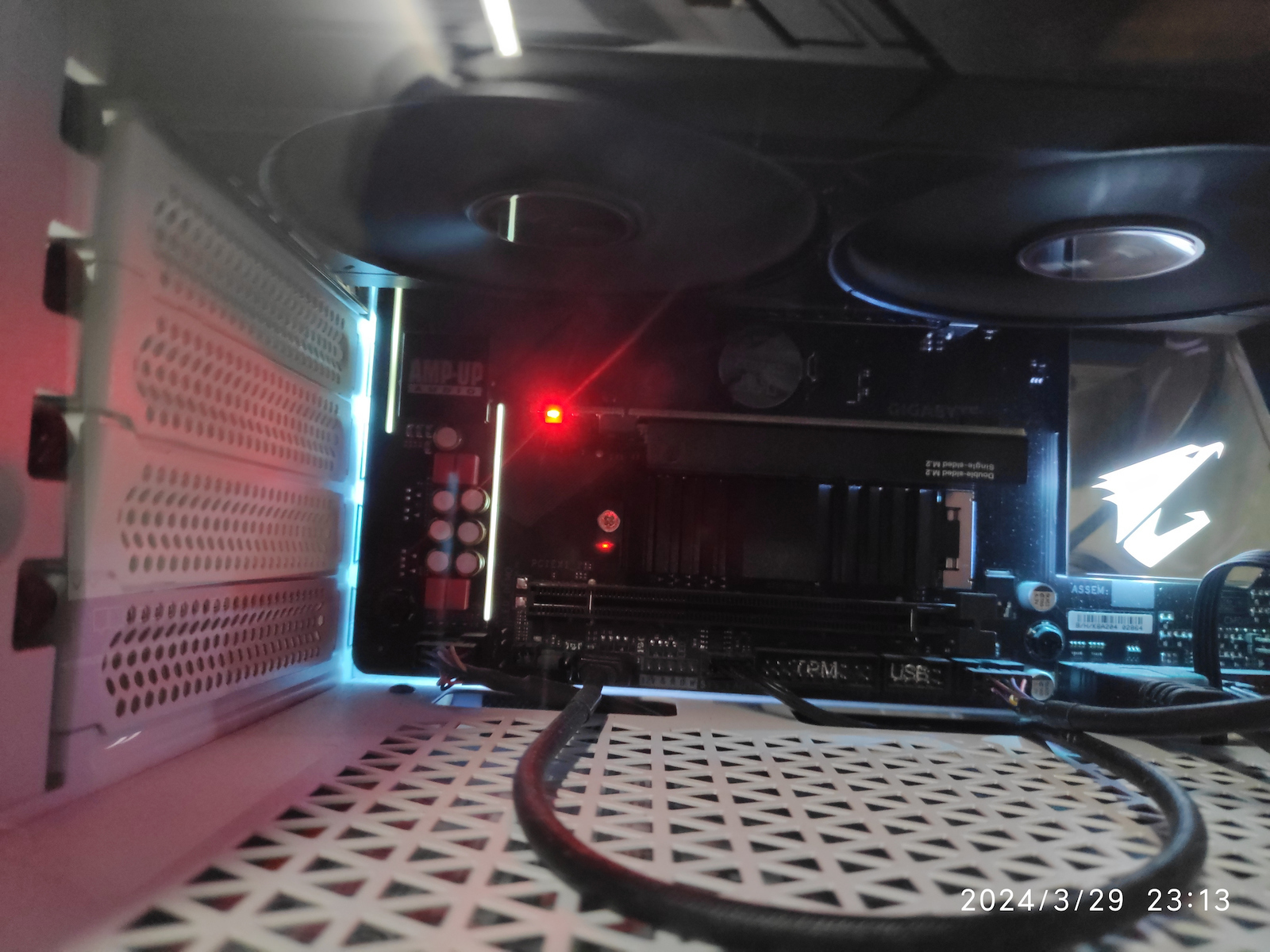
    Purchased at the end of January 2024 for €6 including shipping. Installed on an Aorus B450 Pro (rev 1.0) with BIOS F61a. It houses a Kingston NV2 1TB that is cooled by the Be Quiet MC1. The installation was very easy. The drive accommodates games with long loading times (BeamNG.Drive & Hogwarts Legacy). The card has a red light that indicates it is functioning (permanently on) and that the disk is in use (flashing). It is very powerful at first and if you are not in a very bright room, it distracts your attention when working or playing. Since the initial installation, I have not encountered any problems (~3 months now) despite daily extended use. I am considering buying another one for the last available slot on the motherboard if I need extra space in the future. It goes without saying that based on price, build quality, ease of installation, etc., it is highly recommended with 1000. I will update the review if anything changes in the future

    Translated from Greek ·
    Did you find this review helpful?
  • ntra2001
    5
    2 out of 2 members found this review helpful

    It does what it says 100%. Installed on an Asrock h410m-hvs motherboard that does not have an M.2 connection with a Crucial P3 M.2 500GB CT500P3SSD8 disk.

    Translated from Greek ·
    Did you find this review helpful?
  • Geezer
    5
    9 out of 9 members found this review helpful

    It does what it says. If you have a free PCI-E slot on your motherboard, you can add an M.2 NVMe drive. In order for the drive to have the operating system, the motherboard must support it. I used it on a B450 motherboard to add a second NVMe drive and it works fine. If the PCI-E slot is 2.0 like in my case, then the speed of the drive will theoretically max out at PCI-E 2.0x4=2000mb/s, which is reasonable. I can't speak for its durability over time, but it is generally recommended.

    Translated from Greek ·
    Did you find this review helpful?
  • Verified purchase

    It does what it says.
    Very good plug and play.

    Translated from Greek ·
    Did you find this review helpful?
  • Verified purchase

    not bad very good it works as intended

    Translated from Greek ·
    Did you find this review helpful?
  • 5
    1 out of 1 members found this review helpful

    Verified purchase

    Very good, it also works on PCIe 4.0 port

    Translated from Greek ·
    Did you find this review helpful?
  • Verified purchase

  • Verified purchase

  • Verified purchase

  • Verified purchase

  • Verified purchase

  • Verified purchase

  • Verified purchase

  • Verified purchase

  • Verified purchase

  • Installed in a PCIe slot and the speeds it gave me in writing and reading are 3126Mbps and 3024Mbps

    Translated from Greek ·
    0
  • Purchased at the end of January 2024 for €6 including shipping. Installed on an Aorus B450 Pro (rev 1.0) with BIOS F61a. It houses a Kingston NV2 1TB that is cooled by the Be Quiet MC1. The installation was very easy. The drive accommodates games with long loading times (BeamNG.Drive & Hogwarts Legacy). The card has a red light that indicates it is functioning (permanently on) and that the disk is in use (flashing). It is very powerful at first and if you are not in a very bright room, it distracts your attention when working or playing. Since the initial installation, I have not encountered any problems (~3 months now) despite daily extended use. I am considering buying another one for the last available slot on the motherboard if I need extra space in the future. It goes without saying that based on price, build quality, ease of installation, etc., it is highly recommended with 1000. I will update the review if anything changes in the future
    Translated from Greek ·
    1
  • It does what it says 100%. Installed on an Asrock h410m-hvs motherboard that does not have an M.2 connection with a Crucial P3 M.2 500GB CT500P3SSD8 disk.

    Translated from Greek ·
    2
  • It does what it says. If you have a free PCI-E slot on your motherboard, you can add an M.2 NVMe drive. In order for the drive to have the operating system, the motherboard must support it. I used it on a B450 motherboard to add a second NVMe drive and it works fine. If the PCI-E slot is 2.0 like in my case, then the speed of the drive will theoretically max out at PCI-E 2.0x4=2000mb/s, which is reasonable. I can't speak for its durability over time, but it is generally recommended.

    Translated from Greek ·
    9
  • It does what it says.
    Very good plug and play.

    Translated from Greek ·
    0
  • See all

Description & Specifications

16x PCIe expansion card to M.2 M Key NVMe.

Manufacturer

Product Number
ST529
Type
PCIe
Connectivity
M.2
Number of Ports
1
Low Profile
No

Important information

Specifications are collected from official manufacturer websites. Please verify the specifications before proceeding with your final purchase. If you notice any problem you can report it here.

Reviews (16)

  1. 14
  2. 2
  3. 3 stars
    0
  4. 2 stars
    0
  5. 1 star
    0
Review this product

Reviews by our members

  • Installed in a PCIe slot and the speeds it gave me in writing and reading are 3126Mbps and 3024Mbps

    Translated from Greek ·
    Did you find this review helpful?
  • __peris__
    5
    1 out of 1 members found this review helpful

    Verified purchase

    Purchased at the end of January 2024 for €6 including shipping. Installed on an Aorus B450 Pro (rev 1.0) with BIOS F61a. It houses a Kingston NV2 1TB that is cooled by the Be Quiet MC1. The installation was very easy. The drive accommodates games with long loading times (BeamNG.Drive & Hogwarts Legacy). The card has a red light that indicates it is functioning (permanently on) and that the disk is in use (flashing). It is very powerful at first and if you are not in a very bright room, it distracts your attention when working or playing. Since the initial installation, I have not encountered any problems (~3 months now) despite daily extended use. I am considering buying another one for the last available slot on the motherboard if I need extra space in the future. It goes without saying that based on price, build quality, ease of installation, etc., it is highly recommended with 1000. I will update the review if anything changes in the future

    Translated from Greek ·
    Did you find this review helpful?
  • ntra2001
    5
    2 out of 2 members found this review helpful

    It does what it says 100%. Installed on an Asrock h410m-hvs motherboard that does not have an M.2 connection with a Crucial P3 M.2 500GB CT500P3SSD8 disk.

    Translated from Greek ·
    Did you find this review helpful?
  • Geezer
    5
    9 out of 9 members found this review helpful

    It does what it says. If you have a free PCI-E slot on your motherboard, you can add an M.2 NVMe drive. In order for the drive to have the operating system, the motherboard must support it. I used it on a B450 motherboard to add a second NVMe drive and it works fine. If the PCI-E slot is 2.0 like in my case, then the speed of the drive will theoretically max out at PCI-E 2.0x4=2000mb/s, which is reasonable. I can't speak for its durability over time, but it is generally recommended.

    Translated from Greek ·
    Did you find this review helpful?
  • Verified purchase

    It does what it says.
    Very good plug and play.

    Translated from Greek ·
    Did you find this review helpful?
  • Verified purchase

    not bad very good it works as intended

    Translated from Greek ·
    Did you find this review helpful?
  • 5
    1 out of 1 members found this review helpful

    Verified purchase

    Very good, it also works on PCIe 4.0 port

    Translated from Greek ·
    Did you find this review helpful?
  • Verified purchase

  • Verified purchase

  • Verified purchase

  • Verified purchase

  • Verified purchase

  • Verified purchase

  • Verified purchase

  • Verified purchase

  • Verified purchase

  • Installed in a PCIe slot and the speeds it gave me in writing and reading are 3126Mbps and 3024Mbps

    Translated from Greek ·
    0
  • Purchased at the end of January 2024 for €6 including shipping. Installed on an Aorus B450 Pro (rev 1.0) with BIOS F61a. It houses a Kingston NV2 1TB that is cooled by the Be Quiet MC1. The installation was very easy. The drive accommodates games with long loading times (BeamNG.Drive & Hogwarts Legacy). The card has a red light that indicates it is functioning (permanently on) and that the disk is in use (flashing). It is very powerful at first and if you are not in a very bright room, it distracts your attention when working or playing. Since the initial installation, I have not encountered any problems (~3 months now) despite daily extended use. I am considering buying another one for the last available slot on the motherboard if I need extra space in the future. It goes without saying that based on price, build quality, ease of installation, etc., it is highly recommended with 1000. I will update the review if anything changes in the future
    Translated from Greek ·
    1
  • It does what it says 100%. Installed on an Asrock h410m-hvs motherboard that does not have an M.2 connection with a Crucial P3 M.2 500GB CT500P3SSD8 disk.

    Translated from Greek ·
    2
  • It does what it says. If you have a free PCI-E slot on your motherboard, you can add an M.2 NVMe drive. In order for the drive to have the operating system, the motherboard must support it. I used it on a B450 motherboard to add a second NVMe drive and it works fine. If the PCI-E slot is 2.0 like in my case, then the speed of the drive will theoretically max out at PCI-E 2.0x4=2000mb/s, which is reasonable. I can't speak for its durability over time, but it is generally recommended.

    Translated from Greek ·
    9
  • It does what it says.
    Very good plug and play.

    Translated from Greek ·
    0
  • See all
4,10 €
14,00 €   shipping cost